from pathlib import Path

from typing import Literal
import numpy as np
import pandas as pd
import plotly.express as px
import ramanspy as rp

import warnings

warnings.filterwarnings("ignore", category=SyntaxWarning)This post grew out of an interview homework and a Kaggle competition. It gives an overview of Raman spectroscopy and then works through a machine learning pipeline for analyzing Raman spectra. The accompanying code is on GitHub at raman-spectra.
Section 1 covers the physics: what inelastic scattering is, why Stokes lines dominate anti-Stokes lines, how Raman and infrared selection rules complement each other, and what a spectrometer is made of.
Section 2 turns to data. The Dig4Bio Raman Transfer Learning Challenge dataset serves as the running example, and an embedded notebook explores it well enough to show why raw spectra from eight different instruments cannot be fed to a model as they are. Section 2.3 then works through the preprocessing pipeline one step at a time — cropping, Whitaker–Hayes cosmic-ray removal, Savitzky–Golay denoising, and asPLS baseline correction — following the implementations in RamanSPy.
Section 3 predicts analyte concentrations from the preprocessed spectra. The model is PLS regression, the standard chemometrics baseline: a linear map from spectra to concentrations built through a low-dimensional latent space. The section derives the algorithm as scikit-learn implements it, since the geometry of scores, loadings, and rotations is what makes the fitted model interpretable.
The codebase also contains SpecBERT, an experimental transformer toolkit that adapts BERT/ViT-style encoders to 1D spectra, with masked spectral modeling for self-supervised pretraining and supervised fine-tuning for regression or classification. It was largely generated with AI assistance as a proof of concept and should be read as a sketch rather than as production software. It is included because it suggests how representation learning might complement classical chemometrics when unlabeled spectra are plentiful and concentration labels are scarce.
Raman spectroscopy: an overview
This section reviews the principle, the instrumentation, and the interpretation of a Raman spectrum. The main source is the Wikipedia article on Raman spectroscopy (Wikipedia contributors 2025).
What Raman spectroscopy measures
Raman spectroscopy is a non-destructive technique for observing vibrational, rotational, and other low-frequency modes in a system. What it returns is a structural fingerprint, precise enough to identify and characterize a molecule. The technique is named after the Indian physicist Sir C. V. Raman, who discovered the effect in 1928 with his student K. S. Krishnan and received the Nobel Prize in Physics in 1930.
The underlying phenomenon is the inelastic scattering of monochromatic light, in practice a laser. When light interacts with a molecule, almost all of it scatters at the incident energy and wavelength; this is Rayleigh scattering, and it carries no chemical information. About one photon in ten million scatters at a different energy instead. That is the Raman effect, and the energy difference is where the chemistry is.
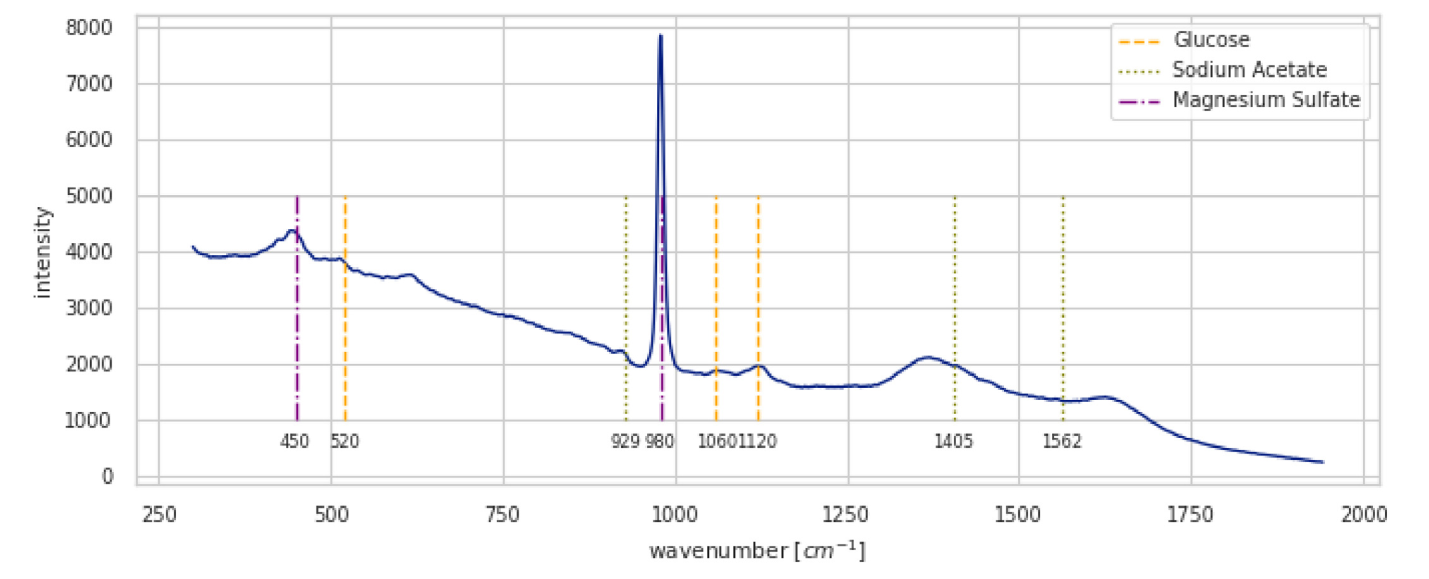
Figure 1 shows what the result looks like.
The physical principle
Molecular vibrations and degrees of freedom
A molecule of \(N\) atoms has \(3N\) degrees of freedom, since each atom can move independently along \(x\), \(y\), and \(z\). Not all of these are vibrations. Three of them describe translation of the molecule as a rigid body through space. Another two or three describe rotation about its center of mass: two for a linear molecule, three for a non-linear one. Whatever remains is internal vibration, the stretching, bending, twisting, and rocking of the bonds themselves:
\[ \text{non-linear: } 3N - 6 \text{ modes}, \qquad \text{linear: } 3N - 5 \text{ modes}. \]
This count is worth doing before looking at a spectrum, because it bounds the number of fundamental bands one can expect to find.
Vibrational energy
Vibrational energy is quantized. A bond cannot hold an arbitrary amount of it, only discrete levels, like the rungs of a ladder. The quantum harmonic oscillator is the standard first approximation, with levels
\[ E_n = h\left(n + \tfrac{1}{2}\right)\nu , \]
where \(n = 0, 1, 2, \dots\) is the quantum number, \(h\) is Planck’s constant, and \(\nu\) is the natural frequency of the vibration, which depends on the stiffness of the bond and on the masses of the atoms it joins.
Raman spectroscopy never measures \(E_n\) itself. It measures the energy required to jump between levels, in practice the transition from \(n=0\) to \(n=1\). That difference \(\Delta E = h\nu\) is what appears as a peak, reported as a Raman shift in wavenumbers (\(\text{cm}^{-1}\)).
Raman scattering
A laser photon striking a molecule pushes it into an unstable, extremely short-lived virtual state, from which it immediately relaxes by emitting a new photon. Three things can happen:
- Rayleigh scattering (elastic). The molecule returns to the vibrational level it started from, and the emitted photon has exactly the energy of the incident one. This is by far the most common outcome and carries no chemical information.
- Stokes scattering (inelastic). The molecule starts in the ground state \(n=0\) and relaxes to a higher level \(n=1\). Having absorbed the vibrational quantum, the emitted photon comes out with \(h\nu\) less energy than it went in with. This is the signal normally measured.
- Anti-Stokes scattering (inelastic). The molecule starts in an already excited state \(n=1\) and relaxes to the ground state, so the emitted photon leaves with \(h\nu\) more energy than it arrived with.
At room temperature the Boltzmann distribution puts the vast majority of molecules in the ground state, which is why Stokes peaks are always considerably more intense than anti-Stokes peaks.
Raman-active and IR-active vibrations
Not every vibration produces a Raman signal, and the rule that decides is exactly what separates Raman from infrared spectroscopy. A vibration is Raman active only if it changes the polarizability of the molecule, that is, how readily the electron cloud deforms under an external electric field such as the laser’s. A vibration is IR active only if it changes the dipole moment.
The two rules are largely complementary. Symmetric vibrations such as C–C or S–S stretches usually produce a large change in polarizability, so they are strong in Raman and weak or absent in IR. Asymmetric vibrations of polar bonds such as C=O produce a large change in dipole moment, so they are strong in IR and often weak in Raman. For a molecule with a center of symmetry, such as CO₂, the rule of mutual exclusion makes the separation strict: no vibration can be both IR and Raman active.
The table below summarizes the difference between the two quantities.
| Feature | Dipole moment (\(\mu\)) | Polarizability (\(\alpha\)) |
|---|---|---|
| Nature | Intrinsic, permanent property | Induced, response property |
| Origin | Unequal sharing of electrons between atoms of different electronegativity | Deformation of the electron cloud by an external field |
| Existence | Present even with no external field | Describes only the potential to deform; the deformation itself requires a field |
| Example | H₂O is polar and has a large dipole moment | Benzene is non-polar but highly polarizable |
| Selection rule | A change during the vibration makes it IR active | A change during the vibration makes it Raman active |
Fluorescence and Raman scattering
Fluorescence is the other thing that happens when light meets matter, and in practice it is the main obstacle to a clean Raman measurement. The two processes differ in mechanism and in everything that follows from it.
| Feature | Raman scattering | Fluorescence |
|---|---|---|
| Mechanism | Scattering through a virtual state | Absorption and re-emission through real electronic states |
| Timescale | Essentially instantaneous (femtoseconds) | Delayed by the fluorescence lifetime (nanoseconds) |
| Energy shift | Small, discrete shifts set by vibrational energies | One large, broad shift set by the gap between electronic states |
| Information | A sharp fingerprint of specific vibrations | A broad band indicating that a fluorophore is present |
| Efficiency | About 1 photon in \(10^7\), hence a very weak signal | Can exceed 90%, hence a very strong signal |
A weak, sharp signal sitting on top of a strong, broad one is the situation that the baseline correction of Section 2.3 exists to handle.
Instrumentation
A Raman spectrometer is built around one problem: isolating the extremely weak Raman signal from the overwhelming Rayleigh scattering that accompanies it. Its essential components are
- a laser, providing a stable monochromatic source, typically visible (532 nm, 633 nm) or near-infrared (785 nm, 1064 nm), the latter chosen to reduce fluorescence;
- illumination and collection optics, lenses or microscope objectives that focus the beam onto the sample and gather the scattered light, down to areas of about one micron in micro-Raman spectroscopy;
- an optical filter, notch or edge, the critical component, which rejects the Rayleigh line while passing the Stokes and anti-Stokes light;
- a dispersive element, a diffraction grating that separates the signal into its constituent wavelengths;
- a detector, almost always a charge-coupled device (CCD), sensitive enough to record the whole spectrum at once.
The CCD is also the source of one of the artifacts treated below: a cosmic ray hitting the detector during acquisition leaves a spike that looks like a very narrow Raman peak.
Reading a Raman spectrum
The horizontal axis of a spectrum such as Figure 1 is the Raman shift in \(\text{cm}^{-1}\), which corresponds to the vibrational energy of the bonds. Because it is a shift rather than an absolute wavelength, it does not depend on the laser used, which is what makes spectra comparable across instruments. The vertical axis is intensity in arbitrary units, proportional both to the concentration of the molecule and to how Raman active the vibration in question is. That proportionality to concentration is the entire basis for the regression models of Section 3.
Each peak corresponds to a specific vibration, and the spectrum splits into two regions of different character. The fingerprint region, roughly 400–1800 \(\text{cm}^{-1}\), is dense with bending and stretching modes whose combined pattern is unique to each molecule. The functional group region, roughly 1800–4000 \(\text{cm}^{-1}\), is sparser and more directly interpretable, containing C–H stretches around 2800–3100 \(\text{cm}^{-1}\), C≡C triple bonds around 2100–2300 \(\text{cm}^{-1}\), and O–H stretches around 3200–3600 \(\text{cm}^{-1}\).
Advantages and limitations
Advantages
Raman spectroscopy uses low-power light and generally leaves the sample intact. It needs almost no sample preparation and works on solids, liquids, and gases, often straight through a glass or plastic container. Water is a weak Raman scatterer, which makes the technique well suited to biological and aqueous samples and is a decisive advantage over infrared spectroscopy. Micro-Raman resolves chemical information at the micron scale, the fingerprint it produces is sharp enough for unambiguous identification, and coupling to fiber optics allows remote and in-situ monitoring.
Limitations
The effect is inherently inefficient, so acquisition can be slow. Fluorescence is the most serious difficulty: it is orders of magnitude stronger than the Raman signal and can bury it entirely, which is why near-infrared lasers around 785 nm are so common. High laser intensity can heat or burn a sensitive sample. And since the technique probes molecular bonds, it is not suited to elemental analysis of metals.
Exploration and preprocessing
The data from the interview homework is not public, so the dataset from the Kaggle competition (Hassfurther 2025) takes its place here. Both the dataset and the competition come from the article (Lange et al. 2025), which compares machine learning methods on Raman spectra collected on eight different spectrometers.
The aim below is not to reproduce the extensive analysis of that article, but to work through the simpler approaches implemented for the homework. All spectral processing uses RamanSPy (Georgiev et al. 2024).
The notebook that follows explores the dataset, applies the preprocessing pipeline step by step, and compares it against a background-subtraction alternative. The algorithms it calls are derived afterwards in Section 2.3.
Raman challenge dataset analysis
This notebook explores the dig-4-bio-raman transfer learning challenge dataset: how the multi-instrument spectra are stored, what a raw spectrum looks like before any processing, and what each step of the preprocessing pipeline does to it.
"""
Define common paths and preprocessing pipelines.

This section sets up:
- Data directory path
- Standard preprocessing pipeline (without normalization)
  - Cropping to fingerprint region (300-1942 cm⁻¹)
  - Cosmic ray removal (Whitaker-Hayes)
  - Denoising (Savitzky-Golay filter)
  - Baseline correction (ASPLS)

Note: Normalization is commented out as it can destroy concentration information
for regression tasks.
"""

# Data directory path
data_path = Path("../data/dig-4-bio-raman-transfer-learning-challenge")

# Fingerprint region
MIN_WAVENUMBER = 300
MAX_WAVENUMBER = 1942

# Standard preprocessing pipeline without normalization
# This pipeline is suitable for regression tasks where we want to preserve
# concentration-related intensity information
standard_pipeline_without_normalisation = rp.preprocessing.Pipeline([
    rp.preprocessing.misc.Cropper(region=(MIN_WAVENUMBER, MAX_WAVENUMBER)),  # Fingerprint region
    rp.preprocessing.despike.WhitakerHayes(),          # Remove cosmic rays
    rp.preprocessing.denoise.SavGol(window_length=9, polyorder=3),  # Smooth noise
    rp.preprocessing.baseline.ASPLS(),                 # Remove baseline drift
    # rp.preprocessing.normalise.MinMax()  # Excluded for regression tasks
])
"""
Utility functions
"""
def find_spectral_columns(df: pd.DataFrame) -> tuple[list[str], list[str], np.ndarray]:
"""
Identifies spectral data columns by checking if the column name can be converted to a float.
This is a robust way to separate metadata from spectral data.
"""
spectral_cols = []
metadata_cols = []
for col in df.columns:
try:
float(col)
spectral_cols.append(col)
except (ValueError, TypeError):
metadata_cols.append(col)
wavenumbers = pd.to_numeric(spectral_cols)
return metadata_cols, spectral_cols, wavenumbers
def build_background_subtraction_pipeline(background: rp.Spectrum) -> rp.preprocessing.Pipeline:
"""
Builds a background subtraction pipeline with a specified region for cropping.
"""
background = rp.preprocessing.misc.Cropper(region=(MIN_WAVENUMBER, MAX_WAVENUMBER)).apply(background)
return rp.preprocessing.Pipeline([
rp.preprocessing.misc.Cropper(region=(MIN_WAVENUMBER, MAX_WAVENUMBER)),
rp.preprocessing.misc.BackgroundSubtractor(background=background)
])Dataset description
The dataset holds Raman spectra recorded on eight instruments — Anton 532, Anton 785, Kaiser, Metrohm, Mettler Toledo, Tec 5, Timegate, and Tornado — for samples of known composition. Three analytes vary between samples, all in g/L: glucose, sodium acetate (Na_acetate), and magnesium sulfate (Mg_SO4).
All samples were measured at room temperature with an exposure time specific to each instrument. Most instruments recorded five replicate spectra per sample; Kaiser and Timegate recorded essentially one. Instrument availability varied during the campaign, so the sample sets are not identical across spectrometers.
The instruments also differ in ways that any analysis has to account for. Their wavenumber ranges do not coincide: Anton 785 stops at 2300 cm⁻¹ where Anton 532 reaches 3500, and Kaiser starts below zero. Their resolutions differ just as much, from 511 points per spectrum on Timegate to 6593 on Kaiser. The largest range common to all eight is 300–1941 cm⁻¹, which is where the crop used throughout comes from: restricting every spectrum to it is a precondition for comparing instruments, not an optimization.
We start with a single instrument, anton_532, to establish the structure of the data and look at one raw spectrum.
"""
Load and visualize a sample spectrum from the anton_532 instrument.

This demonstrates:
1. Loading CSV data with spectral columns (wavenumbers) and metadata
2. Separating spectral data from metadata
3. Creating a RamanSPy SpectralContainer for analysis
4. Visualizing a raw spectrum with its concentration information
"""

# Load data from anton_532 instrument
df = pd.read_csv(data_path / "anton_532.csv").drop(columns=["MSM_present", "fold_idx"])

# Separate spectral columns (numeric column names = wavenumbers) from metadata
metadata_cols, spectral_cols, wavenumbers = find_spectral_columns(df)

# Create RamanSPy SpectralContainer for easier manipulation
spectral_container = rp.SpectralContainer(
    spectral_data=df[spectral_cols].values,
    spectral_axis=wavenumbers
)

# Select first spectrum for visualization
spectrum = spectral_container[0]
metadata = df[metadata_cols].iloc[0].to_dict()

# Create informative title with concentration information
title = (
    f"Original Spectrum - "
    f"glucose {metadata['glucose']:.4f} g/L - "
    f"Na_acetate {metadata['Na_acetate']:.4f} g/L - "
    f"Mg_SO4 {metadata['Mg_SO4']:.4f} g/L"
)

# Plot the spectrum
rp.plot.spectra(spectra=[spectrum], plot_type="single", title=title)
rp.plot.show()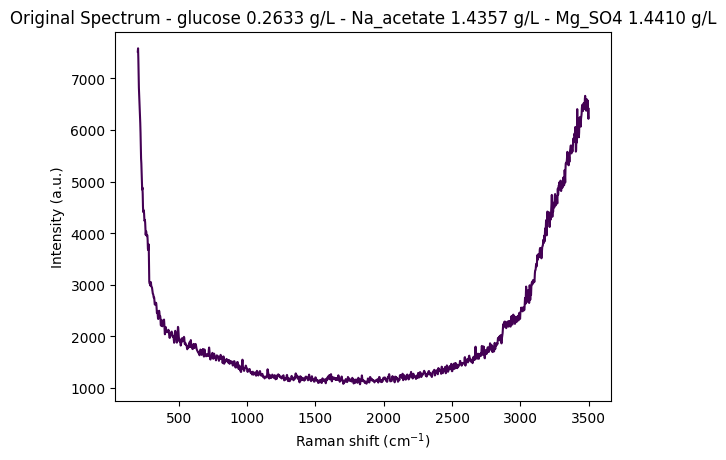
Data structure overview
Each row of the DataFrame is one spectrum together with the concentrations of the sample it came from. The columns are of two kinds: metadata columns carrying the concentrations and other sample information, and spectral columns whose names are the wavenumbers themselves, in cm⁻¹. That naming convention is what find_spectral_columns relies on to tell the two apart.
# Display the first few rows of the dataset
df.head(5)| 200.0 | 202.0 | 204.0 | 206.0 | 208.0 | 210.0 | 212.0 | 214.0 | 216.0 | 218.0 | ... | 3488.0 | 3490.0 | 3492.0 | 3494.0 | 3496.0 | 3498.0 | 3500.0 | glucose | Na_acetate | Mg_SO4 | |
|---|---|---|---|---|---|---|---|---|---|---|---|---|---|---|---|---|---|---|---|---|---|
| 0 | 7519.06 | 7582.15 | 7379.73 | 7054.04 | 6818.64 | 6684.24 | 6562.20 | 6398.03 | 6256.17 | 6135.72 | ... | 6539.65 | 6475.20 | 6573.45 | 6488.44 | 6284.99 | 6216.51 | 6409.21 | 0.26335 | 1.4357 | 1.44101 |
| 1 | 7414.24 | 7502.98 | 7327.93 | 7002.97 | 6760.01 | 6638.17 | 6539.84 | 6360.47 | 6200.67 | 6080.42 | ... | 6507.23 | 6451.34 | 6564.97 | 6465.79 | 6241.37 | 6171.89 | 6358.46 | 0.26335 | 1.4357 | 1.44101 |
| 2 | 7376.45 | 7474.90 | 7304.00 | 6961.46 | 6691.31 | 6557.30 | 6470.64 | 6309.66 | 6177.40 | 6090.05 | ... | 6501.41 | 6432.22 | 6521.16 | 6452.89 | 6248.68 | 6137.06 | 6318.74 | 0.26335 | 1.4357 | 1.44101 |
| 3 | 7383.60 | 7456.90 | 7264.59 | 6938.71 | 6707.66 | 6594.61 | 6493.20 | 6307.50 | 6144.74 | 6033.89 | ... | 6498.85 | 6412.12 | 6532.58 | 6459.36 | 6240.35 | 6146.15 | 6325.52 | 0.26335 | 1.4357 | 1.44101 |
| 4 | 7345.77 | 7435.40 | 7263.58 | 6929.82 | 6671.51 | 6544.19 | 6459.28 | 6302.71 | 6158.40 | 6043.02 | ... | 6506.29 | 6414.26 | 6530.51 | 6435.62 | 6214.08 | 6156.26 | 6348.95 | 0.26335 | 1.4357 | 1.44101 |
5 rows × 1654 columns
Step-by-step preprocessing visualization
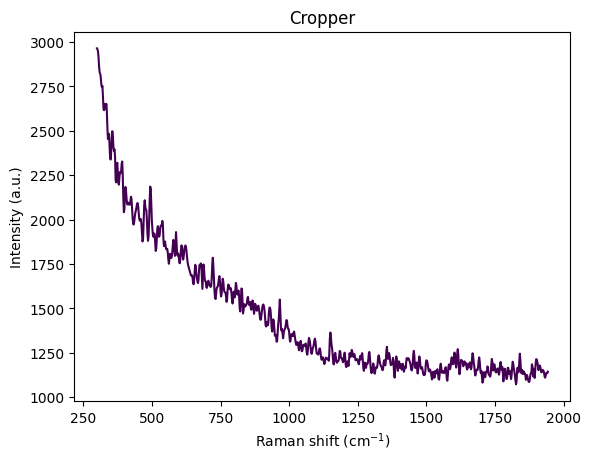
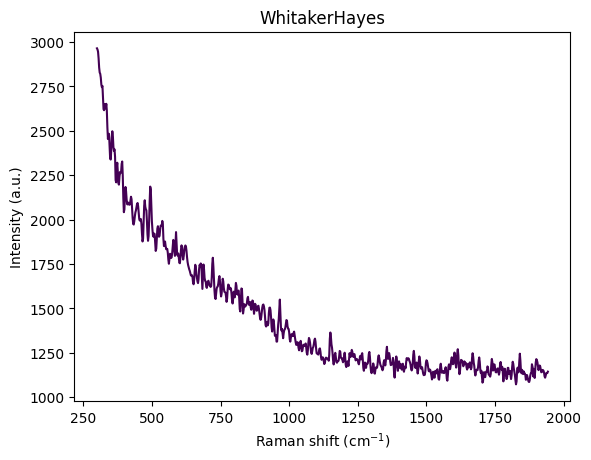
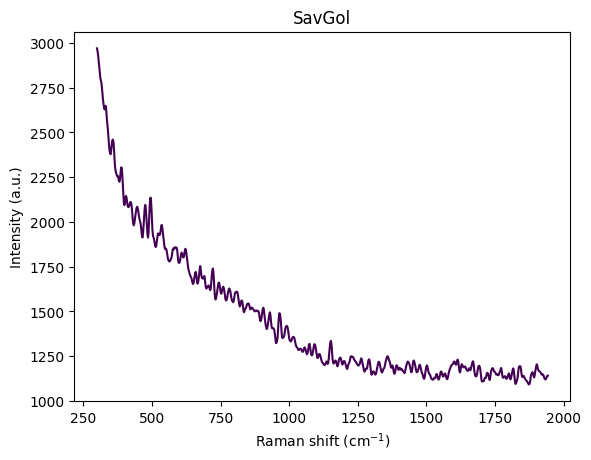
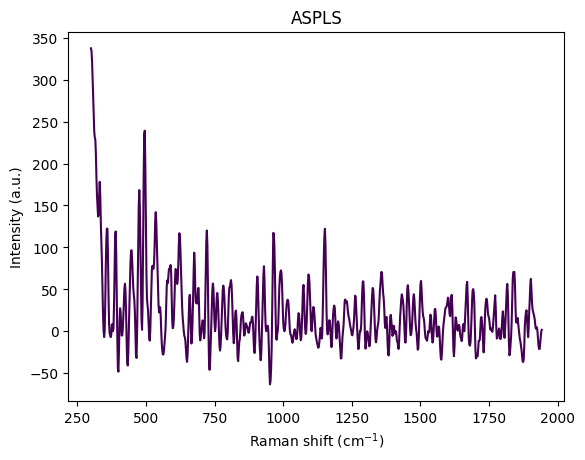
A raw spectrum carries several things that are not signal: a broad fluorescence background, sharp spikes where cosmic rays struck the detector, random measurement noise, and unreliable regions at the edges of the instrument’s range. The pipeline removes them in a fixed order, and the plots below show what each step does to a single spectrum.
The order is not arbitrary. Cropping to 300–1942 cm⁻¹ comes first, so that the later steps never see the edges. Whitaker–Hayes despiking comes before smoothing, because a smoothing filter applied to a spike spreads it over the window rather than removing it. Savitzky–Golay denoising comes next, and asPLS baseline correction last, since its weighting reads the noise level off the spectrum and behaves better once that noise has been reduced.
df = pd.read_csv(data_path / "anton_532.csv").drop( columns=["MSM_present", "fold_idx"])
metadata_cols, spectral_cols, wavenumbers = find_spectral_columns(df)
spectral_container = rp.SpectralContainer(
    spectral_data=df[spectral_cols].values,
    spectral_axis=wavenumbers
)
spectrum = spectral_container[0]
metadata = df[metadata_cols].iloc[0].to_dict()
title = f"Original Spectrum - glucose {metadata['glucose']:.4f} gL - Na_acetate {metadata['Na_acetate']:.4f} gL - Mg_SO4 {metadata['Mg_SO4']:.4f} gL"
rp.plot.spectra(spectra=[spectrum], plot_type="single", title=title)
rp.plot.show()
for step in standard_pipeline_without_normalisation:
    spectrum = step.apply(spectrum)
    title = f"{step.__class__.__name__}"
    rp.plot.spectra([spectrum], plot_type="single", title=title)
    rp.plot.show()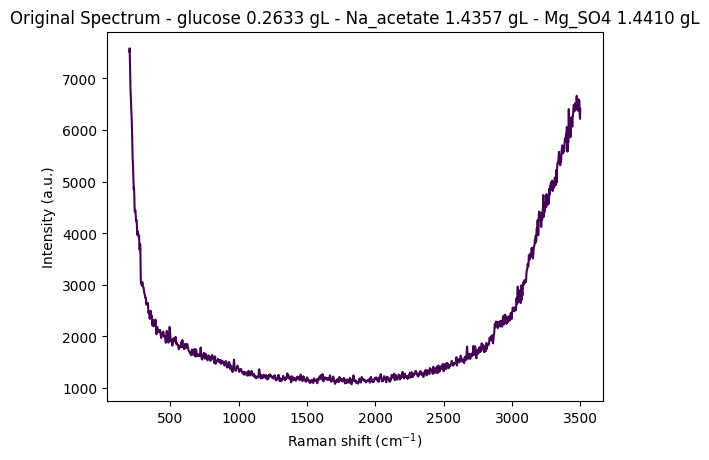
Understanding spectral cropping
The raw spectrum above runs from 200 to 3500 cm⁻¹ and shows what cropping is for. A strong fluorescence background curves under the entire range. Below about 450 cm⁻¹ there are edge effects, the Rayleigh tail, and optical artifacts; above about 3000 cm⁻¹ the O–H stretch of water dominates everything else. The chemically informative part, the fingerprint region between roughly 400 and 1800 cm⁻¹, sits in between.
The reference paper, Comparing machine learning methods on Raman spectra from eight different spectrometers, crops to 300–1942 cm⁻¹, and that is the range used here. It is slightly wider than the fingerprint region because it is chosen for a different reason: it is the largest range common to all eight instruments — 300 to 1941 cm⁻¹, checking the files directly — which is what makes spectra from different devices comparable at all. It keeps the bands that matter — glucose around 800–1150 cm⁻¹, acetate near 920 cm⁻¹, MgSO₄ near 980 cm⁻¹ — while discarding the water O–H stretch and the instrument-specific edges.
Sample structure and organization
The dataset is organized around unique concentration triplets: a combination of glucose, sodium acetate, and magnesium sulfate concentrations defines a sample. Most instruments (Anton 532, Anton 785, Metrohm, Mettler Toledo, Tec 5, Tornado) recorded five replicate spectra of each triplet; Kaiser and Timegate recorded one.
This replicate structure matters twice over. It gives a direct handle on measurement reproducibility, since replicates differ only by noise, and it constrains cross-validation later on: replicates of one sample must not be split between training and validation folds.
Exploring the concentration distribution
Counting the unique concentration triplets shows how many distinct samples the instrument measured, how often each was repeated, and hence the shape of the experimental design.
df_metadata = df[metadata_cols]
df_metadata[["glucose", "Na_acetate", "Mg_SO4"]].value_counts()
glucose Na_acetate Mg_SO4
0.00000 0.00000 0.000000 10
0.022899 5
1.483750 5
3.490220 5
0.01612 0.005016 5
0.38593 0.023827 5
0.65286 0.046091 5
0.71544 1.567450 5
0.75931 0.017697 5
0.76773 3.945410 5
1.29106 0.000000 5
1.37442 1.355800 5
1.39750 3.308900 5
0.24955 0.08245 3.454390 5
0.25369 0.00000 0.022609 5
0.25636 0.67294 0.005511 5
0.25649 0.74089 3.345560 5
0.25787 0.00000 0.000000 5
0.26229 0.03709 1.494600 5
0.26335 1.43570 1.441010 5
0.27710 0.69733 1.441180 5
0.28256 1.33788 0.035751 5
0.29784 1.56128 3.348590 5
0.49945 1.33009 0.003688 5
0.51645 1.02701 1.328620 5
0.52096 0.00000 0.015037 5
0.52616 0.00000 1.396560 5
0.53269 0.68172 0.056479 5
0.56078 1.07925 3.139890 5
0.79631 1.06674 3.090570 5
1.02342 0.71756 1.557450 5
1.18537 0.00000 2.948570 5
4.56573 0.69828 1.541520 5
4.62097 0.97254 0.014210 5
4.63261 0.69969 0.022235 5
4.73407 0.67310 0.003497 5
4.77883 0.00000 0.023272 5
4.78962 1.03913 1.497530 5
4.87666 0.72635 3.073870 5
4.91288 1.03532 3.302040 5
5.12832 0.02430 1.715070 5
5.24672 0.02440 3.361270 5
6.39311 0.00000 0.024451 5
10.16120 0.00000 1.477840 5
10.28120 0.66554 0.000000 5
10.35390 0.00000 0.000000 5
10.39640 0.68902 1.602520 5
10.59310 1.11418 3.484130 5
10.65220 0.00000 2.620210 5
10.66050 1.13599 1.624690 5
10.71080 0.74408 3.480790 5
10.74480 1.05836 0.005669 5
16.73440 0.00000 0.022216 5
Name: count, dtype: int64Assigning sample numbers
groupby(...).ngroup() numbers each distinct triplet, so that replicates of the same sample share a sample_number. Sorting on it afterwards brings those replicates together, which is convenient for everything below: grouping replicates, picking one representative spectrum per sample, and following a given sample through the preprocessing steps.
df['sample_number'] = df.groupby(['glucose', 'Na_acetate', 'Mg_SO4']).ngroup()df = df.sort_values(by="sample_number")
df| 200.0 | 202.0 | 204.0 | 206.0 | 208.0 | 210.0 | 212.0 | 214.0 | 216.0 | 218.0 | ... | 3490.0 | 3492.0 | 3494.0 | 3496.0 | 3498.0 | 3500.0 | glucose | Na_acetate | Mg_SO4 | sample_number | |
|---|---|---|---|---|---|---|---|---|---|---|---|---|---|---|---|---|---|---|---|---|---|
| 48 | 7872.51 | 7949.13 | 7756.47 | 7430.07 | 7191.07 | 7054.33 | 6923.01 | 6728.96 | 6566.42 | 6446.71 | ... | 8358.85 | 8459.03 | 8365.43 | 8120.00 | 7994.58 | 8164.45 | 0.0000 | 0.0 | 0.000000 | 0 |
| 47 | 7855.57 | 7937.75 | 7754.15 | 7431.91 | 7196.21 | 7069.05 | 6947.50 | 6745.40 | 6582.47 | 6474.62 | ... | 8294.69 | 8415.91 | 8343.10 | 8109.79 | 7992.89 | 8171.26 | 0.0000 | 0.0 | 0.000000 | 0 |
| 46 | 7880.69 | 7968.58 | 7784.68 | 7442.57 | 7186.43 | 7063.44 | 6968.17 | 6777.16 | 6612.35 | 6503.68 | ... | 8341.36 | 8440.34 | 8340.85 | 8101.21 | 7993.53 | 8176.15 | 0.0000 | 0.0 | 0.000000 | 0 |
| 49 | 7816.74 | 7903.64 | 7718.65 | 7384.09 | 7142.29 | 7031.14 | 6940.11 | 6749.42 | 6575.63 | 6450.89 | ... | 8321.98 | 8416.93 | 8310.16 | 8071.10 | 7973.64 | 8140.15 | 0.0000 | 0.0 | 0.000000 | 0 |
| 45 | 7927.66 | 8014.66 | 7817.07 | 7476.43 | 7234.11 | 7111.39 | 6999.47 | 6808.78 | 6644.33 | 6525.25 | ... | 8359.07 | 8461.60 | 8376.35 | 8146.79 | 8041.58 | 8224.00 | 0.0000 | 0.0 | 0.000000 | 0 |
| ... | ... | ... | ... | ... | ... | ... | ... | ... | ... | ... | ... | ... | ... | ... | ... | ... | ... | ... | ... | ... | ... |
| 197 | 8207.04 | 8318.43 | 8149.32 | 7811.73 | 7548.74 | 7407.86 | 7296.73 | 7115.31 | 6970.95 | 6873.25 | ... | 9045.37 | 9158.60 | 9078.45 | 8841.36 | 8711.15 | 8854.53 | 16.7344 | 0.0 | 0.022216 | 52 |
| 196 | 8297.09 | 8374.05 | 8181.89 | 7849.53 | 7608.91 | 7486.01 | 7376.52 | 7186.54 | 7024.39 | 6912.22 | ... | 9154.26 | 9271.12 | 9179.31 | 8934.16 | 8822.59 | 8995.83 | 16.7344 | 0.0 | 0.022216 | 52 |
| 195 | 8478.47 | 8586.03 | 8417.81 | 8090.71 | 7841.44 | 7706.42 | 7591.60 | 7406.22 | 7241.26 | 7116.70 | ... | 9541.84 | 9634.93 | 9526.42 | 9289.84 | 9193.64 | 9367.68 | 16.7344 | 0.0 | 0.022216 | 52 |
| 198 | 8144.21 | 8233.26 | 8056.15 | 7729.10 | 7491.60 | 7380.43 | 7282.35 | 7076.46 | 6901.83 | 6794.68 | ... | 8967.69 | 9041.05 | 8962.62 | 8754.40 | 8638.11 | 8801.52 | 16.7344 | 0.0 | 0.022216 | 52 |
| 199 | 8084.45 | 8189.22 | 8040.56 | 7728.67 | 7486.21 | 7363.75 | 7264.74 | 7068.97 | 6883.15 | 6744.28 | ... | 8949.49 | 9057.16 | 8963.22 | 8726.82 | 8633.93 | 8811.21 | 16.7344 | 0.0 | 0.022216 | 52 |
270 rows × 1655 columns
Comparing preprocessing pipelines: standard vs. background subtraction
Two preprocessing approaches are compared below. The standard pipeline crops, despikes, denoises, and corrects the baseline. The background subtraction pipeline crops and then subtracts a reference spectrum, leaving everything else alone.
The comparison is run twice: once on spectra from different concentrations, to see whether a pipeline preserves the differences a regression will need, and once on replicates of a single concentration, to see how much variability survives it.
The two behave differently, and the difference is instructive. Background subtraction produces clearly distinct profiles across concentrations, since whatever is common to every sample is removed and what remains is concentration-dependent. The standard pipeline produces spectra that look more alike, because removing artifacts and baseline also removes part of the amplitude that distinguishes one concentration from another. Neither is simply better: the first preserves more quantitative signal, the second is less sensitive to what varies between measurements.
One caveat on the reference. The background subtraction pipeline uses the first spectrum of the dataset as its background. For replicates of a single sample that is the first replicate; across samples it is the first sample in the dataset, which is the zero-concentration one.
# Note: Required for exporting static images in Quarto documents.
# (Comment out these lines to enable interactive Plotly plots in Jupyter or other interactive environments.)
import plotly.io as pio
pio.renderers.default = 'png'

def plot_spectra_interactive(
    df: pd.DataFrame,
    pipeline_type: Literal["standard", "background"] = "standard",
    samples_type: Literal["same", "different"] = "same",
    height: int = 800,
) -> None:
    metadata_cols, spectral_cols, wavenumbers = find_spectral_columns(df)
    spectral_container = rp.SpectralContainer(
        spectral_data=df[spectral_cols].values,
        spectral_axis=wavenumbers,
    )

    fig_title = f"Plot of {pipeline_type} pipeline with {samples_type} samples"

    match pipeline_type:
        case "standard":
            spectra_list = standard_pipeline_without_normalisation.apply(spectral_container)
        case "background":
            spectra_list = build_background_subtraction_pipeline(background=spectral_container[0]).apply(spectral_container)

    # Series labels
    match samples_type:
        case "same":
            series_labels = list(range(len(df)))
        case "different":
            series_labels = df[["glucose", "Na_acetate", "Mg_SO4"]].apply(lambda x: f"glucose {x['glucose']:.2f} gL - Na_acetate {x['Na_acetate']:.2f} gL - Mg_SO4 {x['Mg_SO4']:.2f} gL", axis=1).tolist()

    all_spectra_dfs = []
    for i, spectrum in enumerate(spectra_list):
        temp_df = pd.DataFrame({
            'Wavenumber': spectrum.spectral_axis,
            'Intensity': spectrum.spectral_data
        })
        temp_df['Series'] = series_labels[i]
        all_spectra_dfs.append(temp_df)

    # Combine all the small DataFrames into one large, tidy DataFrame
    plot_df = pd.concat(all_spectra_dfs, ignore_index=True)

    # Create the interactive plot
    fig = px.line(
        plot_df,
        x='Wavenumber',
        y='Intensity',
        color='Series',          # Each series gets a different color line
        title=fig_title,
        labels={                 # Custom labels for axes
            "Wavenumber": "Wavenumber (cm⁻¹)",
            "Intensity": "Intensity (a.u.)"
        },
        template='plotly_white',  # A clean template with grids
        height=height,
    )

    # Update subplot titles to be cleaner (optional)
    # fig.for_each_annotation(lambda a: a.update(text=a.text.split("=")[1]))

    # Display the figure in the Jupyter Notebook
    fig.show()
Comparing pipelines on different concentrations
Taking one representative spectrum per concentration triplet shows how much of the concentration-dependent signal each pipeline leaves standing — which is exactly what a regression model will have to work with.
different_samples_df = (
    df.groupby("sample_number", as_index=False)
    .nth(0)
)
different_samples_df.head(5)| 200.0 | 202.0 | 204.0 | 206.0 | 208.0 | 210.0 | 212.0 | 214.0 | 216.0 | 218.0 | ... | 3490.0 | 3492.0 | 3494.0 | 3496.0 | 3498.0 | 3500.0 | glucose | Na_acetate | Mg_SO4 | sample_number | |
|---|---|---|---|---|---|---|---|---|---|---|---|---|---|---|---|---|---|---|---|---|---|
| 48 | 7872.51 | 7949.13 | 7756.47 | 7430.07 | 7191.07 | 7054.33 | 6923.01 | 6728.96 | 6566.42 | 6446.71 | ... | 8358.85 | 8459.03 | 8365.43 | 8120.00 | 7994.58 | 8164.45 | 0.0 | 0.00000 | 0.000000 | 0 |
| 27 | 7867.47 | 7945.25 | 7751.45 | 7424.17 | 7188.73 | 7061.26 | 6942.80 | 6761.27 | 6611.74 | 6500.41 | ... | 8623.98 | 8714.13 | 8628.46 | 8391.91 | 8265.12 | 8434.56 | 0.0 | 0.00000 | 0.022899 | 1 |
| 207 | 7342.39 | 7399.16 | 7207.68 | 6881.40 | 6641.70 | 6524.32 | 6434.70 | 6271.56 | 6124.36 | 6011.24 | ... | 7215.12 | 7326.84 | 7226.49 | 6984.68 | 6873.00 | 7048.59 | 0.0 | 0.00000 | 1.483750 | 2 |
| 84 | 7405.46 | 7469.17 | 7290.53 | 6987.57 | 6773.68 | 6670.61 | 6572.76 | 6380.83 | 6213.01 | 6102.20 | ... | 7914.66 | 8002.84 | 7926.06 | 7731.41 | 7653.32 | 7804.36 | 0.0 | 0.00000 | 3.490220 | 3 |
| 190 | 7344.06 | 7410.08 | 7226.07 | 6909.59 | 6673.01 | 6540.97 | 6424.29 | 6245.51 | 6085.45 | 5962.36 | ... | 6989.71 | 7082.35 | 6989.41 | 6777.86 | 6697.66 | 6873.22 | 0.0 | 0.01612 | 0.005016 | 4 |
5 rows × 1655 columns
plot_spectra_interactive(df=different_samples_df, pipeline_type="standard", samples_type="different")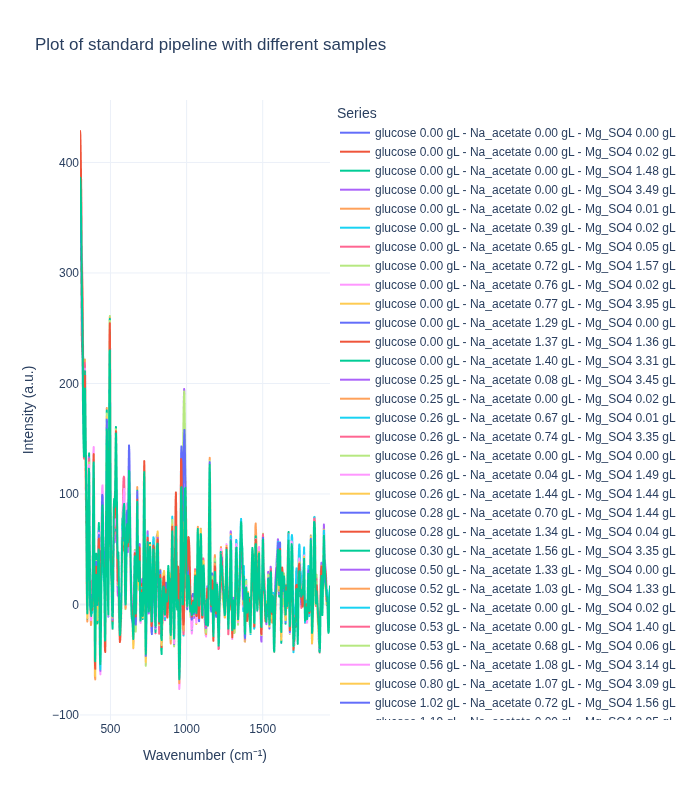
plot_spectra_interactive(df=different_samples_df, pipeline_type="background", samples_type="different")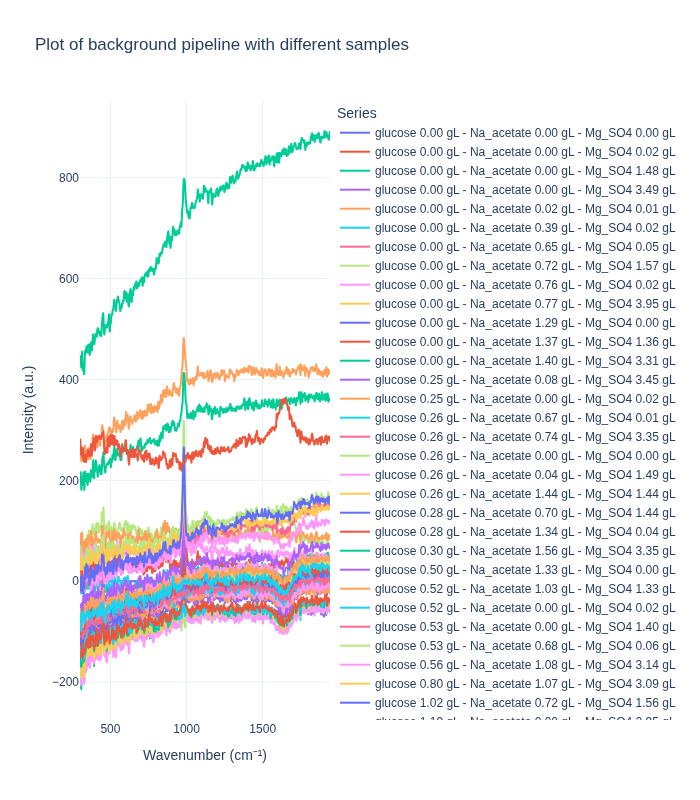
Comparing pipelines on replicate spectra
The complementary question is what happens to spectra that should be identical. Picking one triplet at random and plotting all of its replicates shows the reproducibility of the instrument and how much of the residual variability each pipeline removes.
# Draw a random sample number
unique_sample_numbers = df["sample_number"].unique()
random_sample_number = np.random.choice(unique_sample_numbers)
same_samples_df = df[df["sample_number"] == random_sample_number]
same_samples_df| 200.0 | 202.0 | 204.0 | 206.0 | 208.0 | 210.0 | 212.0 | 214.0 | 216.0 | 218.0 | ... | 3490.0 | 3492.0 | 3494.0 | 3496.0 | 3498.0 | 3500.0 | glucose | Na_acetate | Mg_SO4 | sample_number | |
|---|---|---|---|---|---|---|---|---|---|---|---|---|---|---|---|---|---|---|---|---|---|
| 39 | 7320.48 | 7419.34 | 7262.94 | 6932.90 | 6659.87 | 6511.08 | 6412.69 | 6254.91 | 6114.20 | 6003.54 | ... | 6505.33 | 6628.53 | 6562.14 | 6346.97 | 6249.52 | 6424.52 | 0.26229 | 0.03709 | 1.4946 | 18 |
| 37 | 7406.77 | 7464.21 | 7264.81 | 6934.42 | 6697.93 | 6580.23 | 6468.39 | 6254.99 | 6088.88 | 6006.50 | ... | 6514.41 | 6650.11 | 6582.10 | 6355.25 | 6250.23 | 6432.15 | 0.26229 | 0.03709 | 1.4946 | 18 |
| 35 | 7400.97 | 7517.01 | 7365.01 | 7025.82 | 6752.42 | 6622.32 | 6541.35 | 6361.16 | 6198.60 | 6089.23 | ... | 6604.90 | 6699.57 | 6597.09 | 6374.15 | 6294.01 | 6489.00 | 0.26229 | 0.03709 | 1.4946 | 18 |
| 38 | 7331.09 | 7410.65 | 7238.04 | 6920.44 | 6677.50 | 6547.06 | 6443.18 | 6276.78 | 6130.41 | 6014.91 | ... | 6526.00 | 6659.57 | 6572.41 | 6339.60 | 6255.41 | 6434.59 | 0.26229 | 0.03709 | 1.4946 | 18 |
| 36 | 7386.98 | 7465.57 | 7288.87 | 6969.29 | 6732.37 | 6613.17 | 6507.77 | 6306.82 | 6140.97 | 6039.23 | ... | 6593.39 | 6661.59 | 6571.50 | 6375.59 | 6293.98 | 6460.65 | 0.26229 | 0.03709 | 1.4946 | 18 |
5 rows × 1655 columns
plot_spectra_interactive(df=same_samples_df, pipeline_type="standard", samples_type="same")
plot_spectra_interactive(df=same_samples_df, pipeline_type="background", samples_type="same")
Understanding measurement variability
Replicates of the same sample are not identical. The spread comes from the noise inherent to Raman measurement, from small differences in sample positioning and laser focus, from the characteristics of the instrument itself, and from environmental conditions during acquisition.
The two pipelines act on that spread differently. The standard pipeline reduces it, since noise and artifacts are much of what distinguishes one replicate from another. Background subtraction can preserve or even amplify it, depending on how representative the chosen reference spectrum is.
Whatever is left after preprocessing sets a floor on prediction error: no model can resolve concentration differences smaller than the variation between two measurements of the same sample. Knowing roughly where that floor lies is what makes the R² values of the modeling notebook interpretable rather than merely disappointing.
Preprocessing algorithms
Raw Raman spectra arrive with artifacts and noise that would defeat any downstream analysis: a fluorescence background far larger than the signal, cosmic-ray spikes indistinguishable from narrow peaks, random detector noise, and edge regions where the instrument response is unreliable. The standard pipeline removes them in a fixed order — crop, despike, denoise, correct the baseline — and the four subsections below derive each step as RamanSPy implements it (Georgiev et al. 2024).
Spectral cropping
Cropping restricts the spectrum to the region worth analyzing. Given a wavenumber axis \(w\) and a spectrum \(s\), it is a boolean mask applied to both:
\[ w_{\text{cropped}} = w\,[\,w_{\text{min}} \leq w \leq w_{\text{max}}\,], \qquad s_{\text{cropped}} = s\,[\,w_{\text{min}} \leq w \leq w_{\text{max}}\,] . \]
The operation is \(O(n)\) in the spectrum length and does three useful things at once: it discards noisy edge regions, it concentrates the later steps on the informative part of the signal, and it shrinks the data.
The choice of range matters more than the triviality of the operation suggests. The notebooks crop to 300–1942 \(\text{cm}^{-1}\), following (Lange et al. 2025): this is the largest range common to all eight instruments in the dataset — 300 to 1941 \(\text{cm}^{-1}\), going by the files themselves — so cropping to it also makes the spectra mutually comparable. It retains the glucose bands around 800–1150 \(\text{cm}^{-1}\), the acetate band near 920 \(\text{cm}^{-1}\), and the strong MgSO₄ band near 980 \(\text{cm}^{-1}\), while removing the Rayleigh tail below roughly 450 \(\text{cm}^{-1}\) and the O–H stretch of water above 3000 \(\text{cm}^{-1}\), which would otherwise dominate everything else.
Cosmic-ray removal (Whitaker–Hayes)
A cosmic ray striking the CCD during acquisition produces a sharp intensity spike that is easily mistaken for a genuine Raman peak. The Whitaker–Hayes algorithm (Whitaker and Hayes 2018) detects and removes these.
Detection works on the first differences of the spectrum,
\[ \Delta s_i = s_{i+1} - s_i , \]
because differencing amplifies abrupt jumps while flattening the gradual variation of real bands, which makes a spike far easier to see than it is in the raw intensities. Spikes are then flagged by a modified z-score, which replaces the standard deviation by the median absolute deviation
\[ \text{MAD}(x) = \text{median}\big(|x_i - \text{median}(x)|\big), \qquad z_i = 0.6745\,\frac{x_i - \text{median}(x)}{\text{MAD}(x)} , \]
the constant \(0.6745\) being what makes the MAD consistent with the standard deviation for normal data. Median-based statistics matter here: the outliers being hunted are exactly the kind of points that would corrupt a mean-and-variance estimate of the noise level.
Every position with \(|z_{\Delta s_i}| > \tau\) is declared a spike and replaced by the mean of its non-spike neighbors within a kernel of half-width \(k\),
\[ s'_i = \begin{cases} \operatorname{mean}\big(s_j : j \in N(i),\ \text{spike}_j = \text{False}\big) & \text{if } \text{spike}_i = \text{True},\\[2pt] s_i & \text{otherwise}, \end{cases} \]
with \(N(i) = \{\max(0, i-k), \dots, \min(n-1, i+k)\}\). Excluding the neighbors that are themselves spikes is what lets the procedure handle several adjacent contaminated points, and replacing by a local mean rather than by interpolation over a wide window leaves the surrounding peak shapes untouched. RamanSPy defaults to \(\tau = 8\) and kernel_size = 3, which the notebooks keep.
Denoising (Savitzky–Golay)
Random noise obscures weak bands and, more insidiously, produces spurious local maxima that peak-finding routines will happily report. The Savitzky–Golay filter (Savitzky and Golay 1964) suppresses it by local polynomial regression, which preserves peak position and height far better than a moving average does.
For every point of the spectrum, the filter takes a window of window_length points centered on it, fits a polynomial of degree polyorder by least squares,
\[ P(x) = a_0 + a_1 x + \dots + a_p x^p, \qquad \min_{a} \sum_{j=i-m}^{i+m} \big[y_j - P(x_j)\big]^2 , \]
where \(m = (\texttt{window\_length} - 1)/2\), and replaces the point by the fitted value \(y'_i = P(x_i)\). Since the least-squares solution is linear in the data, the whole operation collapses into a convolution with coefficients that depend only on window_length and polyorder, never on the spectrum itself, so the filter costs \(O(n)\) and the coefficients can be computed once.
The reason it works is that averaging over a window suppresses noise while the polynomial retains local curvature. A moving average is the special case \(p = 0\), and it is precisely the flat-fit assumption that flattens narrow peaks; a cubic fit follows the shape of a band through the window instead. The same coefficients also yield smoothed derivatives at no extra cost, which is convenient for peak detection.
window_length must be odd and strictly greater than polyorder; RamanSPy requires both explicitly rather than supplying defaults. The notebooks use window_length = 9 and polyorder = 3. Shorter windows preserve narrow peaks better but remove less noise, longer ones do the reverse, and beyond about 15 points a genuine band starts to broaden visibly.
Baseline correction (asPLS)
The fluorescence background, together with sample-holder and optical contributions, adds a slowly varying baseline that is often larger than the peaks sitting on it. Removing it is the last and most delicate preprocessing step, because a baseline estimator flexible enough to follow the background is also flexible enough to climb into the peaks and eat them.
Every method in this family solves a penalized least-squares problem: find a baseline \(z\) minimizing a compromise between fidelity to the data and smoothness,
\[ Q(z) = \sum_i w_i (y_i - z_i)^2 \; + \; \lambda \sum_j \alpha_j \big(\Delta^d z_j\big)^2 , \]
where \(y\) is the observed spectrum, \(\Delta^d\) is the \(d\)-th order difference operator, and \(\lambda\) sets the global stiffness. With \(d = 2\),
\[ \Delta^2 z = [\,z_2 - 2z_1 + z_0,\ z_3 - 2z_2 + z_1,\ \dots\,] , \]
so the penalty charges for curvature and the minimizer is pulled toward a smooth curve. What distinguishes the members of the family is how the fidelity weights \(w_i\) and the penalty weights \(\alpha_j\) are chosen. RamanSPy exposes several of them through pybaselines — AsLS (Eilers and Boelens 2005), airPLS (Zhang et al. 2010), arPLS, asPLS — and the pipeline here uses asPLS (Zhang et al. 2020).
The original asymmetric least squares method (Eilers and Boelens 2005) fixes \(\alpha_j \equiv 1\) and splits the fidelity weights in two,
\[ w_i = \begin{cases} p & \text{if } y_i > z_i,\\ 1-p & \text{if } y_i \leq z_i, \end{cases} \qquad p \ll 0.5 \ \ (\text{typically } 0.01). \]
Since peaks lie above the baseline, they receive almost no weight, and the fitted curve is pushed underneath them. This is the mechanism that keeps the baseline out of the peaks, and asPLS keeps its spirit while replacing both weightings.
Write \(r = y - z\) for the residual at the current iterate. The fidelity weights become logistic rather than binary,
\[ w_i = \frac{1}{1 + \exp\!\big(\tfrac{k}{\sigma_-}(r_i - \sigma_-)\big)} , \]
where \(\sigma_-\) is the standard deviation of the negative residuals and \(k\) is an asymmetry coefficient. This is a smoothed version of the AsLS split: points far above the baseline get weights near \(0\), points below it get weights near \(1\), and the transition between the two happens over a width set by \(\sigma_-\). Estimating that scale from the negative residuals only is what makes it a measure of background noise rather than of peak height, so the filter adapts to how noisy the spectrum actually is instead of relying on a fixed threshold. The asPLS paper uses \(k=2\); pybaselines, and therefore RamanSPy, defaults to \(k = 0.5\), which its authors report as both closer to the published results and better behaved on noisy data.
The adaptive part of the method is the penalty weight, recomputed at each iteration as the normalized residual magnitude
\[ \alpha_i = \frac{|r_i|}{\max_j |r_j|} \in [0, 1] . \]
Note the direction, which is easy to get backwards. Under a peak the residual is large, so \(\alpha_i \approx 1\) and the full penalty \(\lambda\) applies: the baseline is held stiff exactly where it would otherwise be tempted to rise into the band. Where the baseline already tracks the data, the residual is small, \(\alpha_i\) is small, the penalty is relaxed, and the curve is free to follow the local curvature of the background. A single global \(\lambda\) has to be either too stiff under peaks or too rigid in between; letting \(\alpha\) vary point by point removes that compromise, and it is what the “adaptive smoothness” in the name refers to.
The two weightings are updated alternately with the baseline solve until the weights stop changing, at most a hundred times. RamanSPy inherits the pybaselines defaults \(\lambda = 10^5\), diff_order = 2, and tol = 1e-3, which the notebooks keep.
The complete pipeline
The order of operations is not arbitrary. Cropping comes first so that the later steps never see the noisy edges. Despiking comes before smoothing, because a Savitzky–Golay filter applied to a spike does not remove it, it merely spreads it over the window and makes it harder to detect. Denoising comes before baseline correction, since the residual-based weighting of asPLS reads the noise level off the spectrum and behaves better once that noise is reduced. Normalization, when used, comes last, after the baseline has been removed and intensities are finally comparable.
The pipeline used in both notebooks is therefore
- Cropping to 300–1942 \(\text{cm}^{-1}\);
- Whitaker–Hayes despiking, with
kernel_size = 3andthreshold = 8; - Savitzky–Golay smoothing, with
window_length = 9andpolyorder = 3; - asPLS baseline correction, with \(\lambda = 10^5\) and
diff_order = 2; - MinMax normalization, for the modeling notebook only.
Whatever parameters are chosen, they must stay fixed across every spectrum in a study. Preprocessing is part of the model, and varying it per sample introduces exactly the kind of sample-dependent transformation that a calibration is supposed to be free of.
Machine learning approaches
The task is to predict the concentrations of the three analytes — glucose, sodium acetate, and magnesium sulfate — from a preprocessed spectrum. Models are fitted one instrument at a time, since spectral response and calibration differ enough between the eight spectrometers that a single pooled model would be solving a harder problem than the one at hand.
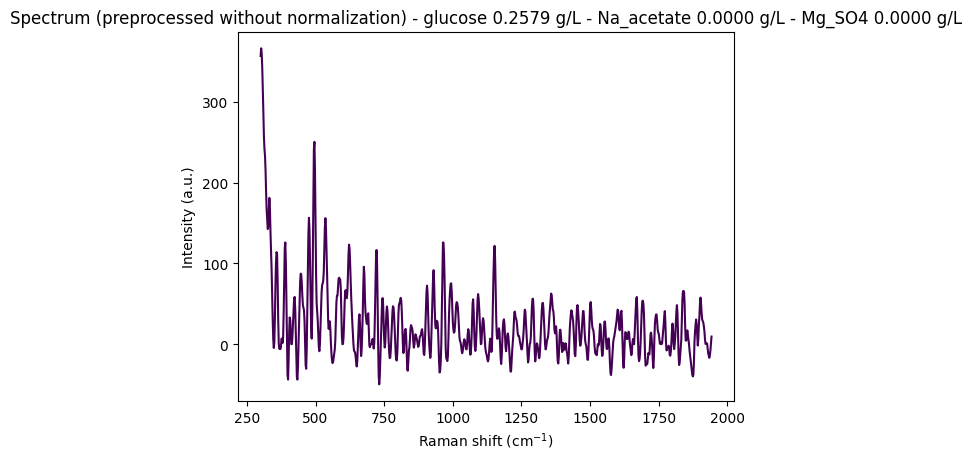
One preprocessing decision is properly a modeling decision and is worth stating here rather than leaving it in the notebook. Peak height is proportional to concentration, so normalizing a spectrum destroys precisely the information a regression needs; but leaving intensities unnormalized also leaves in the instrumental variation — laser power, integration time, focus, detector response — that has nothing to do with chemistry, and on this dataset it leaves intensities reaching values around 350 in arbitrary units. Area-under-the-curve scaling is the worst of both worlds for regression, since forcing every spectrum to unit area erases concentration outright. Internal standard normalization, dividing by a stable reference band, is the principled answer, but the dataset offers no suitable reference peak. The notebook settles on MinMax scaling as a compromise, with the caveat that it ties the scale of each spectrum to whichever point happens to be its maximum. This is discussed at length in the notebook below.
The model itself is PLS regression, derived in Section 3.3.
Raman challenge: machine learning model for concentration prediction
This notebook fits partial least squares (PLS) regression models predicting the concentrations of three compounds — glucose (C₆H₁₂O₆), sodium acetate (Na_acetate), and magnesium sulfate (Mg_SO4) — from Raman spectra.
Models are fitted one instrument at a time. The eight spectrometers differ enough in spectral response and calibration that a single pooled model would be solving the harder transfer problem rather than the calibration problem at hand.
from pathlib import Path
from typing import Literal
import pandas as pd
import numpy as np
import ramanspy as rp
import matplotlib.pyplot as plt
import seaborn as sns
from sklearn.model_selection import GroupKFold, cross_val_predict
from sklearn.cross_decomposition import PLSRegression
from sklearn.metrics import r2_score, root_mean_squared_error

import warnings
warnings.filterwarnings("ignore", category=SyntaxWarning)
# Data directory path
data_path = Path("../data/dig-4-bio-raman-transfer-learning-challenge")
# Fingerprint region
MIN_WAVENUMBER = 300
MAX_WAVENUMBER = 1942
# Standard preprocessing pipeline without normalization
standard_pipeline_without_normalisation = rp.preprocessing.Pipeline([
rp.preprocessing.misc.Cropper(region=(MIN_WAVENUMBER, MAX_WAVENUMBER)), # Fingerprint region
rp.preprocessing.despike.WhitakerHayes(), # Remove cosmic rays
rp.preprocessing.denoise.SavGol(window_length=9, polyorder=3), # Smooth noise
rp.preprocessing.baseline.ASPLS(), # Remove baseline drift
# rp.preprocessing.normalise.MinMax() # Excluded for regression tasks
])
# Standard preprocessing pipeline with normalization
standard_pipeline = rp.preprocessing.Pipeline([
rp.preprocessing.misc.Cropper(region=(MIN_WAVENUMBER, MAX_WAVENUMBER)),
rp.preprocessing.despike.WhitakerHayes(),
rp.preprocessing.denoise.SavGol(window_length=9, polyorder=3),
rp.preprocessing.baseline.ASPLS(),
rp.preprocessing.normalise.MinMax()
])"""
Utility functions
"""
def find_spectral_columns(df: pd.DataFrame) -> tuple[list[str], list[str], np.ndarray]:
"""
Identifies spectral data columns by checking if the column name can be converted to a float.
This is a robust way to separate metadata from spectral data.
"""
spectral_cols = []
metadata_cols = []
for col in df.columns:
try:
float(col)
spectral_cols.append(col)
except (ValueError, TypeError):
metadata_cols.append(col)
wavenumbers = pd.to_numeric(spectral_cols)
return metadata_cols, spectral_cols, wavenumbersNormalization: a preprocessing decision
Whether to normalize the spectra is the one preprocessing choice that is really a modeling choice, and it cuts both ways.
Normalizing removes instrumental variation — laser power, integration time, focus, detector response — so that what differs between two spectra is chemistry rather than measurement conditions. Not normalizing preserves the proportionality between peak height and concentration, which is the physical relationship a quantitative regression is built on.
Before deciding, it is worth looking at the raw intensities: how much do they vary between spectra, and is that variation large enough to need correcting?
"""
Display some random spectra from the dataset
"""

# Load data from anton_532 instrument
df = pd.read_csv(data_path / "anton_532.csv").drop(columns=["MSM_present", "fold_idx"])

# Separate spectral columns (numeric column names = wavenumbers) from metadata
metadata_cols, spectral_cols, wavenumbers = find_spectral_columns(df)

spectral_container = rp.SpectralContainer(
    spectral_data=df[spectral_cols].values,
    spectral_axis=wavenumbers
)

spectral_container = standard_pipeline_without_normalisation.apply(spectral_container)

# Select 2 random spectra
random_indices = np.random.choice(len(df), size=2, replace=False)

for i in random_indices:
    spectrum = spectral_container[i]
    metadata = df[metadata_cols].iloc[i].to_dict()

    # Create informative title with concentration information
    title = (
        f"Spectrum (preprocessed without normalization) - "
        f"glucose {metadata['glucose']:.4f} g/L - "
        f"Na_acetate {metadata['Na_acetate']:.4f} g/L - "
        f"Mg_SO4 {metadata['Mg_SO4']:.4f} g/L"
    )

    # Plot the spectrum
    rp.plot.spectra(spectra=[spectrum], plot_type="single", title=title)
    rp.plot.show()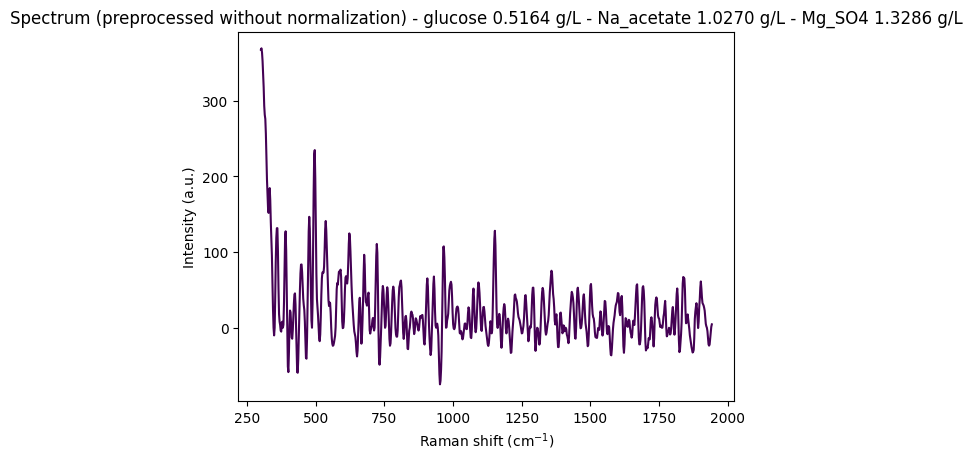
Discussion: normalization in the preprocessing pipeline
Unnormalized intensities reach values around 350 in arbitrary units, large enough to cause trouble for models that expect inputs on a comparable scale. Some normalization is therefore needed. Choosing which is the harder question, since the spectra also carry noise and subtle features that the chosen method must not flatten.
The variation to be corrected comes from the instrument rather than the sample: fluctuations in laser output power, differences in sample positioning and laser focus, differences in measurement duration, and variations in detector sensitivity or calibration. Correcting it is what makes differences between spectra reflect composition rather than measurement conditions.
Common normalization methods
Area under the curve. Divides each spectrum by its total area, so that every spectrum ends up with area 1. This destroys exactly the information a regression needs: a higher concentration produces stronger peaks and therefore a larger area, and AUC scaling erases that difference by construction. Reasonable for classification, where only shape matters; unsuitable for regression.
MinMax scaling. Maps each spectrum to the range [0, 1]. Less destructive than AUC scaling, but the scale factor depends on whichever point happens to be the maximum, which may be an analyte band, a solvent band, or a noise artifact. Different samples then receive different scale factors, which distorts the linear relation between peak height and concentration.
Internal standard normalization. Divides the analyte bands by a stable reference band, taken from a constant component or from a deliberately added internal standard:
Normalized signal = (analyte peak intensity) / (standard peak intensity)This corrects for the instrumental variations listed above while leaving the height-to-concentration relation intact. It is the right answer for quantitative work, provided a suitable reference band exists.
Summary table
| Method | What it does | Pro | Con | Best for |
|---|---|---|---|---|
| Area under the curve | Area = 1 for every spectrum | Isolates shape | Destroys intensity information | Classification |
| MinMax scaling | Rescales to [0, 1] | Preserves relative peak heights | Scale factor varies from sample to sample | Some classification |
| Internal standard | Ratio to a stable band | Corrects instrumental variation, preserves linearity | Requires a suitable reference band | Regression |
Decision
This dataset offers no suitable reference band, so internal standard normalization is not available. Since the raw intensities do need scaling, we settle on MinMax as a compromise, aware that it ties the scale of each spectrum to a single point. This is a known weakness of the models fitted below rather than a solved problem.
Machine learning approach
With the spectra preprocessed, the models can be fitted, one instrument at a time.
Model choice
PLS regression is the standard tool for spectroscopic calibration, because it is built for precisely the difficulties this data presents. There are far more wavenumbers than samples, and adjacent wavenumbers are almost perfectly correlated, so ordinary least squares is not merely unstable but undefined. PLS sidesteps this by projecting the spectra onto a small number of latent components chosen to maximize covariance with the concentrations, and regressing on those instead. The projection doubles as a noise filter, since directions that covary with nothing useful are simply never retained.
Validation strategy
Cross-validation uses GroupKFold with fold_idx as the grouping variable, so that replicate spectra of one sample never straddle the training/validation split. Without grouping, a model could recognize a sample it had already seen under another replicate, and the score would measure memorization rather than generalization to new samples.
Hyperparameter tuning
The number of latent components is the only real hyperparameter. Too few underfit; too many begin fitting noise. We scan 1 to 20 components and keep the value minimizing the root mean squared error of cross-validation (RMSECV).
Evaluation and interpretation
The selected model is scored by R² and RMSE on the cross-validated predictions: R² gives the fraction of variance explained, RMSE the average error in g/L, which is the number that matters practically. Predicted-versus-actual plots show where a model fails rather than only how much, and the PLS loadings show which spectral regions drive its predictions — enough to check that it relies on the bands it ought to rather than on an artifact.
# Loading the data

instrument: Literal["anton_532", "anton_785", "kaiser", "metrohm", "mettler_toledo", "tec5", "timegate", "tornado"] = "anton_532"

df = pd.read_csv(data_path / f"{instrument}.csv").drop(columns=["MSM_present"])
df| 200.0 | 202.0 | 204.0 | 206.0 | 208.0 | 210.0 | 212.0 | 214.0 | 216.0 | 218.0 | ... | 3490.0 | 3492.0 | 3494.0 | 3496.0 | 3498.0 | 3500.0 | glucose | Na_acetate | Mg_SO4 | fold_idx | |
|---|---|---|---|---|---|---|---|---|---|---|---|---|---|---|---|---|---|---|---|---|---|
| 0 | 7519.06 | 7582.15 | 7379.73 | 7054.04 | 6818.64 | 6684.24 | 6562.20 | 6398.03 | 6256.17 | 6135.72 | ... | 6475.20 | 6573.45 | 6488.44 | 6284.99 | 6216.51 | 6409.21 | 0.26335 | 1.43570 | 1.44101 | 0 |
| 1 | 7414.24 | 7502.98 | 7327.93 | 7002.97 | 6760.01 | 6638.17 | 6539.84 | 6360.47 | 6200.67 | 6080.42 | ... | 6451.34 | 6564.97 | 6465.79 | 6241.37 | 6171.89 | 6358.46 | 0.26335 | 1.43570 | 1.44101 | 0 |
| 2 | 7376.45 | 7474.90 | 7304.00 | 6961.46 | 6691.31 | 6557.30 | 6470.64 | 6309.66 | 6177.40 | 6090.05 | ... | 6432.22 | 6521.16 | 6452.89 | 6248.68 | 6137.06 | 6318.74 | 0.26335 | 1.43570 | 1.44101 | 0 |
| 3 | 7383.60 | 7456.90 | 7264.59 | 6938.71 | 6707.66 | 6594.61 | 6493.20 | 6307.50 | 6144.74 | 6033.89 | ... | 6412.12 | 6532.58 | 6459.36 | 6240.35 | 6146.15 | 6325.52 | 0.26335 | 1.43570 | 1.44101 | 0 |
| 4 | 7345.77 | 7435.40 | 7263.58 | 6929.82 | 6671.51 | 6544.19 | 6459.28 | 6302.71 | 6158.40 | 6043.02 | ... | 6414.26 | 6530.51 | 6435.62 | 6214.08 | 6156.26 | 6348.95 | 0.26335 | 1.43570 | 1.44101 | 0 |
| ... | ... | ... | ... | ... | ... | ... | ... | ... | ... | ... | ... | ... | ... | ... | ... | ... | ... | ... | ... | ... | ... |
| 265 | 7832.00 | 7938.65 | 7758.85 | 7401.53 | 7122.56 | 6982.76 | 6884.94 | 6702.59 | 6537.42 | 6417.34 | ... | 7790.07 | 7890.47 | 7786.45 | 7544.57 | 7448.89 | 7652.59 | 10.71080 | 0.74408 | 3.48079 | 4 |
| 266 | 7799.25 | 7874.64 | 7683.97 | 7335.51 | 7069.06 | 6933.33 | 6827.90 | 6633.28 | 6466.11 | 6358.28 | ... | 7735.00 | 7846.83 | 7756.49 | 7530.37 | 7427.52 | 7587.48 | 10.71080 | 0.74408 | 3.48079 | 4 |
| 267 | 7752.49 | 7823.53 | 7631.56 | 7311.92 | 7087.74 | 6973.90 | 6867.04 | 6686.11 | 6522.25 | 6391.02 | ... | 7713.69 | 7774.98 | 7694.02 | 7490.46 | 7377.11 | 7541.42 | 10.71080 | 0.74408 | 3.48079 | 4 |
| 268 | 7757.55 | 7803.91 | 7606.17 | 7295.83 | 7082.62 | 6976.21 | 6870.14 | 6678.14 | 6495.80 | 6352.90 | ... | 7702.41 | 7801.14 | 7693.90 | 7459.89 | 7372.70 | 7559.06 | 10.71080 | 0.74408 | 3.48079 | 4 |
| 269 | 7726.52 | 7799.61 | 7607.11 | 7281.07 | 7047.06 | 6924.05 | 6810.98 | 6627.21 | 6470.48 | 6357.52 | ... | 7624.59 | 7756.07 | 7675.02 | 7459.47 | 7398.34 | 7572.52 | 10.71080 | 0.74408 | 3.48079 | 4 |
270 rows × 1655 columns
# Processing the data

metadata_cols, spectral_cols, wavenumbers = find_spectral_columns(df)
groups = df["fold_idx"].to_numpy()
spectra_raw_df = df[spectral_cols]
Y = df[["glucose", "Na_acetate", "Mg_SO4"]].to_numpy()

spectral_container = rp.SpectralContainer(
    spectral_data=spectra_raw_df.values,
    spectral_axis=wavenumbers,
)

processed_spectra = standard_pipeline.apply(spectral_container)
X_processed = processed_spectra.spectral_data
# We will test a range of components (latent variables)
n_components_range = np.arange(1, 21)
rmsecv_scores = []
r2cv_scores = []
# Use GroupKFold to ensure spectra from the same sample are not split across folds
# This gives a more realistic performance estimate. We use fold_idx as the group.
cv_splitter = GroupKFold(n_splits=5) # 5 groups for 5 folds
for n_comp in n_components_range:
pls = PLSRegression(n_components=n_comp)
# Predict using cross-validation
y_pred_cv = cross_val_predict(pls, X_processed, Y, cv=cv_splitter, groups=groups)
rmsecv = root_mean_squared_error(Y, y_pred_cv)
r2cv = r2_score(Y, y_pred_cv)
rmsecv_scores.append(rmsecv)
r2cv_scores.append(r2cv)
print(f"RMSECV with {n_comp} components: {rmsecv:.4f}")
print(f"R2CV with {n_comp} components: {r2cv:.4f}")
# Find the optimal number of components (the one with the minimum RMSECV)
optimal_n_components = n_components_range[np.argmin(rmsecv_scores)]
print(f"Optimal number of PLS components found: {optimal_n_components}")
# --- Plot RMSECV vs. Number of Components, and R2 vs. Number of Components ---
fig, ax1 = plt.subplots(figsize=(10, 6))
color_rmse = 'tab:red'
color_r2 = 'tab:blue'
ax1.set_xlabel('Number of Components', fontsize=12)
ax1.set_ylabel('RMSE of Cross-Validation (g/L)', color=color_rmse, fontsize=12)
ax1.plot(n_components_range, rmsecv_scores, 'o-', mfc='w', color=color_rmse, label='RMSECV')
ax1.axvline(x=optimal_n_components, color='r', linestyle='--', label=f'Optimal Components = {optimal_n_components}')
ax1.tick_params(axis='y', labelcolor=color_rmse)
ax1.legend(loc='upper left')
ax2 = ax1.twinx()
ax2.set_ylabel('R² of Cross-Validation', color=color_r2, fontsize=12)
ax2.plot(n_components_range, r2cv_scores, '-', color=color_r2, label='R²')
ax2.tick_params(axis='y', labelcolor=color_r2)
ax2.legend(loc='upper right')
plt.title('RMSECV and R² vs. Number of PLS Components', fontsize=16)
fig.tight_layout()
plt.show()RMSECV with 1 components: 2.0614
R2CV with 1 components: 0.0021
RMSECV with 2 components: 1.9507
R2CV with 2 components: 0.1411
RMSECV with 3 components: 2.0019
R2CV with 3 components: 0.1405
RMSECV with 4 components: 1.8235
R2CV with 4 components: 0.2169
RMSECV with 5 components: 1.6823
R2CV with 5 components: 0.3021
RMSECV with 6 components: 1.6804
R2CV with 6 components: 0.2938
RMSECV with 7 components: 1.5609
R2CV with 7 components: 0.3664
RMSECV with 8 components: 1.5313
R2CV with 8 components: 0.3533
RMSECV with 9 components: 1.5394
R2CV with 9 components: 0.3469
RMSECV with 10 components: 1.5132
R2CV with 10 components: 0.3592
RMSECV with 11 components: 1.5052
R2CV with 11 components: 0.3569
RMSECV with 12 components: 1.5003
R2CV with 12 components: 0.3398
RMSECV with 13 components: 1.5246
R2CV with 13 components: 0.3177
RMSECV with 14 components: 1.5137
R2CV with 14 components: 0.3010
RMSECV with 15 components: 1.5298
R2CV with 15 components: 0.2747
RMSECV with 16 components: 1.5465
R2CV with 16 components: 0.2485
RMSECV with 17 components: 1.5418
R2CV with 17 components: 0.2396
RMSECV with 18 components: 1.5498
R2CV with 18 components: 0.2290
RMSECV with 19 components: 1.5826
R2CV with 19 components: 0.1800
RMSECV with 20 components: 1.5891
R2CV with 20 components: 0.1416
Optimal number of PLS components found: 12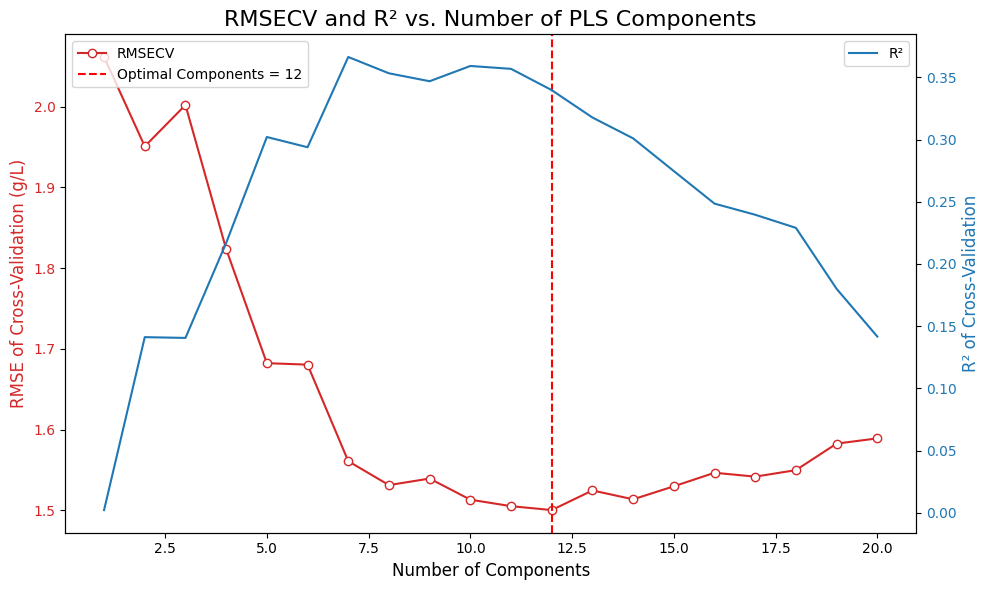
# =============================================================================
# Final Model Training and Evaluation
# =============================================================================

# Create the final PLS model with the optimal number of components
final_pls_model = PLSRegression(n_components=optimal_n_components)

# Get cross-validated predictions for the final model
y_pred_final = cross_val_predict(final_pls_model, X_processed, Y, cv=cv_splitter, groups=groups)

# Calculate final performance metrics (overall)
final_rmse = root_mean_squared_error(Y, y_pred_final)
final_r2 = r2_score(Y, y_pred_final)

print(f"Final Cross-Validated Model Performance (Overall):")
print(f"R²: {final_r2:.4f}")
print(f"RMSE: {final_rmse:.4f} g/L")

# Calculate individual metrics for each target
target_names = ["Glucose", "Na_acetate", "Mg_SO4"]
target_metrics = []

for i, target_name in enumerate(target_names):
    Y_target = Y[:, i]
    y_pred_target = y_pred_final[:, i]
    r2_target = r2_score(Y_target, y_pred_target)
    rmse_target = root_mean_squared_error(Y_target, y_pred_target)
    target_metrics.append((r2_target, rmse_target))
    print(f"{target_name}:")
    print(f"  R²: {r2_target:.4f}")
    print(f"  RMSE: {rmse_target:.4f} g/L")

# --- Predicted vs. Actual Plots for All Targets ---
fig, axes = plt.subplots(1, 3, figsize=(18, 5))

for i, (target_name, ax) in enumerate(zip(target_names, axes)):
    Y_target = Y[:, i]
    y_pred_target = y_pred_final[:, i]
    r2_target, rmse_target = target_metrics[i]

    sns.scatterplot(x=Y_target, y=y_pred_target, alpha=0.7, ax=ax)
    ax.plot([Y_target.min(), Y_target.max()], [Y_target.min(), Y_target.max()],
            'r--', lw=2, label='1:1 Line')
    ax.set_title(f'Predicted vs. Actual {target_name}', fontsize=14)
    ax.set_xlabel('Actual Concentration (g/L)', fontsize=11)
    ax.set_ylabel('Predicted Concentration (g/L)', fontsize=11)
    ax.text(0.05, 0.95, f'R² = {r2_target:.4f}\nRMSE = {rmse_target:.4f} g/L',
            transform=ax.transAxes, fontsize=10,
            bbox=dict(facecolor='white', alpha=0.8), verticalalignment='top')
    ax.legend()
    ax.grid(True, alpha=0.3)
    ax.set_aspect('equal', adjustable='box')

plt.tight_layout()
plt.show()
Final Cross-Validated Model Performance (Overall):
R²: 0.3398
RMSE: 1.5003 g/L
Glucose:
R²: 0.3915
RMSE: 3.3367 g/L
Na_acetate:
R²: -0.1697
RMSE: 0.5485 g/L
Mg_SO4:
R²: 0.7974
RMSE: 0.6159 g/L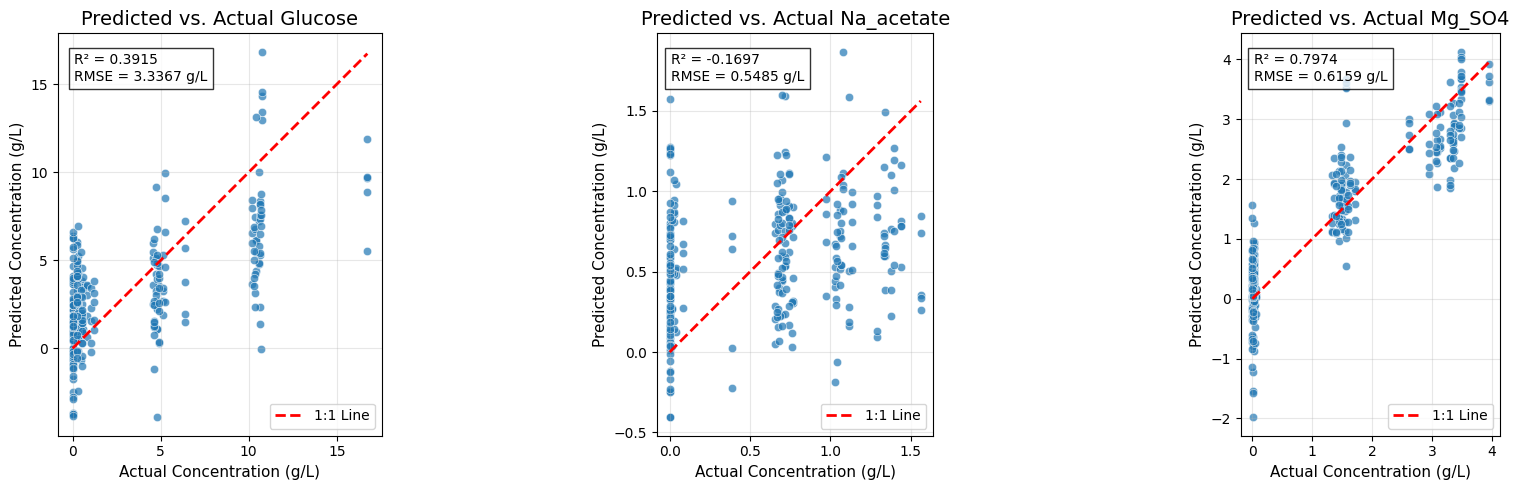
# =============================================================================
# Model Interpretation - Inspecting PLS Loadings
# =============================================================================

# To interpret the model, we fit it on all data and inspect the loadings.
# The loadings show which variables (wavenumbers) are important for each component.
final_pls_model.fit(X_processed, Y)
loadings = final_pls_model.x_loadings_

# --- Plot Loadings for the first few components ---
plt.figure(figsize=(12, 6))
# Ensure wavenumbers and loadings have matching dimensions
wavenumbers_plot = wavenumbers
if hasattr(wavenumbers, 'values'):
    wavenumbers_plot = wavenumbers.values
if len(wavenumbers_plot) != loadings.shape[0]:
    # Try to slice wavenumbers to match loadings shape
    wavenumbers_plot = wavenumbers_plot[:loadings.shape[0]]
for i in range(min(3, optimal_n_components)): # Plot up to the first 3 components
    plt.plot(wavenumbers_plot, loadings[:, i], label=f'Component {i+1}')

plt.title('PLS Loadings', fontsize=16)
plt.xlabel('Raman Shift (cm⁻¹)', fontsize=12)
plt.ylabel('Loading Weight', fontsize=12)
plt.legend()
plt.show()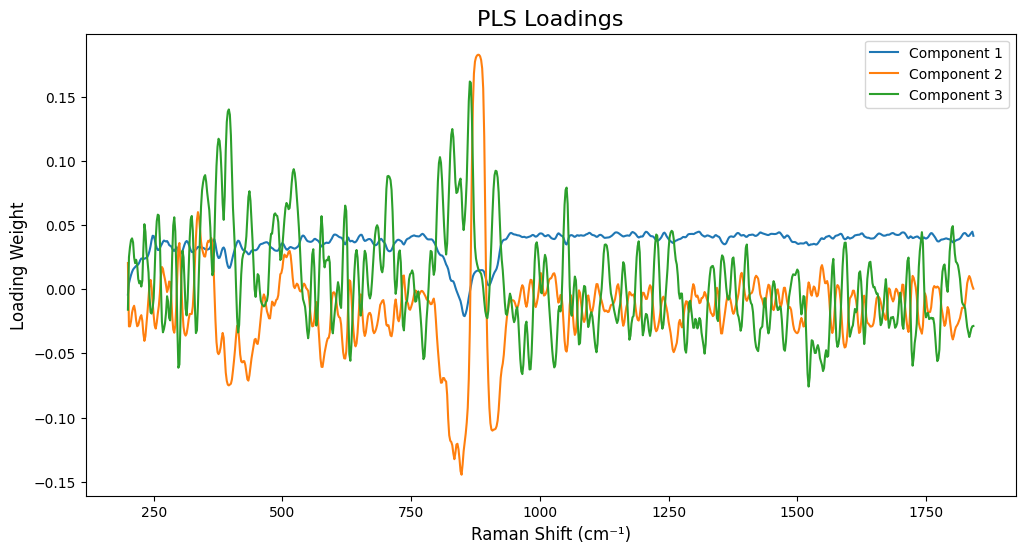
# =============================================================================
# Separate PLS Models Per Target
# =============================================================================
#
# Training one PLS model per target allows:
# - Better interpretability: each target has its own loadings showing which
#   spectral regions are important for that specific compound
# - Independent optimization: each target can have its own optimal number of
#   components
# - Potentially better performance: models can focus on the specific spectral
#   regions relevant to each compound

target_names = ["glucose", "Na_acetate", "Mg_SO4"]
target_models = {}
target_optimal_components = {}
target_metrics_separate = {}
target_predictions_separate = {}

# Store single model metrics for comparison (from cell 11)
target_metrics_single = {}
for i, target_name in enumerate(target_names):
    Y_target = Y[:, i]
    y_pred_target = y_pred_final[:, i]
    r2_target = r2_score(Y_target, y_pred_target)
    rmse_target = root_mean_squared_error(Y_target, y_pred_target)
    target_metrics_single[target_name] = (r2_target, rmse_target)

# Train separate PLS model for each target
for target_idx, target_name in enumerate(target_names):
    print(f"\n{'='*60}")
    print(f"Training PLS model for {target_name}")
    print(f"{'='*60}")

    # Extract single target
    Y_target = Y[:, target_idx].reshape(-1, 1)  # Reshape to (n_samples, 1)

    # Find optimal number of components for this target
    n_components_range = np.arange(1, 21)
    rmsecv_scores = []
    r2cv_scores = []

    for n_comp in n_components_range:
        pls = PLSRegression(n_components=n_comp)
        y_pred_cv = cross_val_predict(pls, X_processed, Y_target, cv=cv_splitter, groups=groups)
        rmsecv = root_mean_squared_error(Y_target, y_pred_cv)
        r2cv = r2_score(Y_target, y_pred_cv)
        rmsecv_scores.append(rmsecv)
        r2cv_scores.append(r2cv)
        print(f"  {n_comp:2d} components: RMSECV={rmsecv:.4f}, R²CV={r2cv:.4f}")

    # Find optimal number of components
    optimal_n_components = n_components_range[np.argmin(rmsecv_scores)]
    target_optimal_components[target_name] = optimal_n_components
    print(f"\n  Optimal components for {target_name}: {optimal_n_components}")

    # Train final model and get cross-validated predictions
    final_pls = PLSRegression(n_components=optimal_n_components)
    y_pred_final_separate = cross_val_predict(final_pls, X_processed, Y_target, cv=cv_splitter, groups=groups)

    # Calculate metrics
    r2_final = r2_score(Y_target, y_pred_final_separate)
    rmse_final = root_mean_squared_error(Y_target, y_pred_final_separate)
    target_metrics_separate[target_name] = (r2_final, rmse_final)
    target_models[target_name] = final_pls
    target_predictions_separate[target_name] = y_pred_final_separate

    print(f"  Final R²: {r2_final:.4f}, RMSE: {rmse_final:.4f} g/L")

# =============================================================================
# Plot Loadings for Each Target (Much More Interpretable!)
# =============================================================================

fig, axes = plt.subplots(len(target_names), 1, figsize=(14, 5*len(target_names)))

# Handle case where we have only one target (axes would be 1D, not 2D)
if len(target_names) == 1:
    axes = [axes]

for idx, target_name in enumerate(target_names):
    model = target_models[target_name]
    # Fit the model on all data to get loadings
    model.fit(X_processed, Y[:, idx].reshape(-1, 1))
    loadings = model.x_loadings_

    # Use wavenumbers from processed spectra to match loadings dimensions
    wavenumbers_processed = processed_spectra.spectral_axis
    if hasattr(wavenumbers_processed, 'values'):
        wavenumbers_processed = wavenumbers_processed.values

    ax = axes[idx]
    n_comp_to_plot = min(3, target_optimal_components[target_name])
    for comp_idx in range(n_comp_to_plot):
        ax.plot(wavenumbers_processed, loadings[:, comp_idx],
                label=f'Component {comp_idx+1}', alpha=0.7, linewidth=1.5)

    ax.set_title(f'PLS Loadings for {target_name} (Optimal: {target_optimal_components[target_name]} components)',
                 fontsize=14, fontweight='bold')
    ax.set_xlabel('Raman Shift (cm⁻¹)', fontsize=12)
    ax.set_ylabel('Loading Weight', fontsize=12)
    ax.legend(loc='best')
    ax.grid(True, alpha=0.3)
    ax.axhline(y=0, color='k', linestyle='--', linewidth=0.5)

plt.tight_layout()
plt.show()

# =============================================================================
# Performance Comparison: Single vs. Separate Models
# =============================================================================

print("\n" + "="*80)
print("Performance Comparison: Single Multi-Output Model vs. Separate Models")
print("="*80)
print(f"{'Target':<15} {'Single Model R²':<18} {'Separate Model R²':<18} {'R² Improvement':<15} {'Single RMSE':<15} {'Separate RMSE':<15} {'RMSE Improvement':<15}")
print("-"*80)

for target_name in target_names:
    single_r2, single_rmse = target_metrics_single[target_name]
    separate_r2, separate_rmse = target_metrics_separate[target_name]
    r2_improvement = separate_r2 - single_r2
    rmse_improvement = single_rmse - separate_rmse  # Positive = better (lower RMSE)

    print(f"{target_name:<15} {single_r2:>17.4f} {separate_r2:>17.4f} {r2_improvement:>+14.4f} {single_rmse:>14.4f} g/L {separate_rmse:>14.4f} g/L {rmse_improvement:>+14.4f} g/L")

print("="*80)

# =============================================================================
# Predicted vs. Actual Plots for Separate Models
# =============================================================================

fig, axes = plt.subplots(1, 3, figsize=(18, 5))

for idx, (target_name, ax) in enumerate(zip(target_names, axes)):
    Y_target = Y[:, idx]
    y_pred_target = target_predictions_separate[target_name].flatten()
    r2_target, rmse_target = target_metrics_separate[target_name]

    sns.scatterplot(x=Y_target, y=y_pred_target, alpha=0.7, ax=ax)
    ax.plot([Y_target.min(), Y_target.max()], [Y_target.min(), Y_target.max()],
            'r--', lw=2, label='1:1 Line')
    ax.set_title(f'Predicted vs. Actual {target_name} (Separate Model)', fontsize=14)
    ax.set_xlabel('Actual Concentration (g/L)', fontsize=11)
    ax.set_ylabel('Predicted Concentration (g/L)', fontsize=11)
    ax.text(0.05, 0.95, f'R² = {r2_target:.4f}\nRMSE = {rmse_target:.4f} g/L\nComponents = {target_optimal_components[target_name]}',
            transform=ax.transAxes, fontsize=10,
            bbox=dict(facecolor='white', alpha=0.8), verticalalignment='top')
    ax.legend()
    ax.grid(True, alpha=0.3)
    ax.set_aspect('equal', adjustable='box')

plt.tight_layout()
plt.show()
============================================================
Training PLS model for glucose
============================================================
   1 components: RMSECV=4.3714, R²CV=-0.0445
   2 components: RMSECV=4.6011, R²CV=-0.1571
   3 components: RMSECV=3.8873, R²CV=0.1740
   4 components: RMSECV=3.6280, R²CV=0.2806
   5 components: RMSECV=3.3775, R²CV=0.3765
   6 components: RMSECV=3.3941, R²CV=0.3703
   7 components: RMSECV=3.3577, R²CV=0.3838
   8 components: RMSECV=3.3525, R²CV=0.3857
   9 components: RMSECV=3.4223, R²CV=0.3598
  10 components: RMSECV=3.4784, R²CV=0.3387
  11 components: RMSECV=3.5761, R²CV=0.3010
  12 components: RMSECV=3.6763, R²CV=0.2613
  13 components: RMSECV=3.7758, R²CV=0.2207
  14 components: RMSECV=3.8433, R²CV=0.1926
  15 components: RMSECV=3.8770, R²CV=0.1784
  16 components: RMSECV=3.9075, R²CV=0.1655
  17 components: RMSECV=3.9259, R²CV=0.1576
  18 components: RMSECV=3.9506, R²CV=0.1469
  19 components: RMSECV=3.9550, R²CV=0.1450
  20 components: RMSECV=3.9898, R²CV=0.1299

  Optimal components for glucose: 8
  Final R²: 0.3857, RMSE: 3.3525 g/L

============================================================
Training PLS model for Na_acetate
============================================================
   1 components: RMSECV=0.5332, R²CV=-0.1053
   2 components: RMSECV=0.5376, R²CV=-0.1238
   3 components: RMSECV=0.5270, R²CV=-0.0800
   4 components: RMSECV=0.5032, R²CV=0.0156
   5 components: RMSECV=0.5282, R²CV=-0.0846
   6 components: RMSECV=0.5444, R²CV=-0.1522
   7 components: RMSECV=0.5339, R²CV=-0.1083
   8 components: RMSECV=0.5567, R²CV=-0.2051
   9 components: RMSECV=0.5732, R²CV=-0.2773
  10 components: RMSECV=0.5949, R²CV=-0.3761
  11 components: RMSECV=0.6134, R²CV=-0.4629
  12 components: RMSECV=0.6396, R²CV=-0.5904
  13 components: RMSECV=0.6623, R²CV=-0.7056
  14 components: RMSECV=0.6793, R²CV=-0.7939
  15 components: RMSECV=0.6882, R²CV=-0.8415
  16 components: RMSECV=0.6992, R²CV=-0.9010
  17 components: RMSECV=0.7049, R²CV=-0.9317
  18 components: RMSECV=0.7113, R²CV=-0.9673
  19 components: RMSECV=0.7204, R²CV=-1.0177
  20 components: RMSECV=0.7285, R²CV=-1.0634

  Optimal components for Na_acetate: 4
  Final R²: 0.0156, RMSE: 0.5032 g/L

============================================================
Training PLS model for Mg_SO4
============================================================
   1 components: RMSECV=1.2813, R²CV=0.1234
   2 components: RMSECV=0.8643, R²CV=0.6011
   3 components: RMSECV=0.6878, R²CV=0.7474
   4 components: RMSECV=0.5916, R²CV=0.8131
   5 components: RMSECV=0.6017, R²CV=0.8067
   6 components: RMSECV=0.6490, R²CV=0.7751
   7 components: RMSECV=0.6623, R²CV=0.7658
   8 components: RMSECV=0.6818, R²CV=0.7518
   9 components: RMSECV=0.7159, R²CV=0.7263
  10 components: RMSECV=0.7463, R²CV=0.7026
  11 components: RMSECV=0.7748, R²CV=0.6794
  12 components: RMSECV=0.7860, R²CV=0.6701
  13 components: RMSECV=0.8074, R²CV=0.6519
  14 components: RMSECV=0.8163, R²CV=0.6441
  15 components: RMSECV=0.8323, R²CV=0.6301
  16 components: RMSECV=0.8413, R²CV=0.6220
  17 components: RMSECV=0.8559, R²CV=0.6088
  18 components: RMSECV=0.8697, R²CV=0.5961
  19 components: RMSECV=0.8806, R²CV=0.5859
  20 components: RMSECV=0.8913, R²CV=0.5758

  Optimal components for Mg_SO4: 4
  Final R²: 0.8131, RMSE: 0.5916 g/L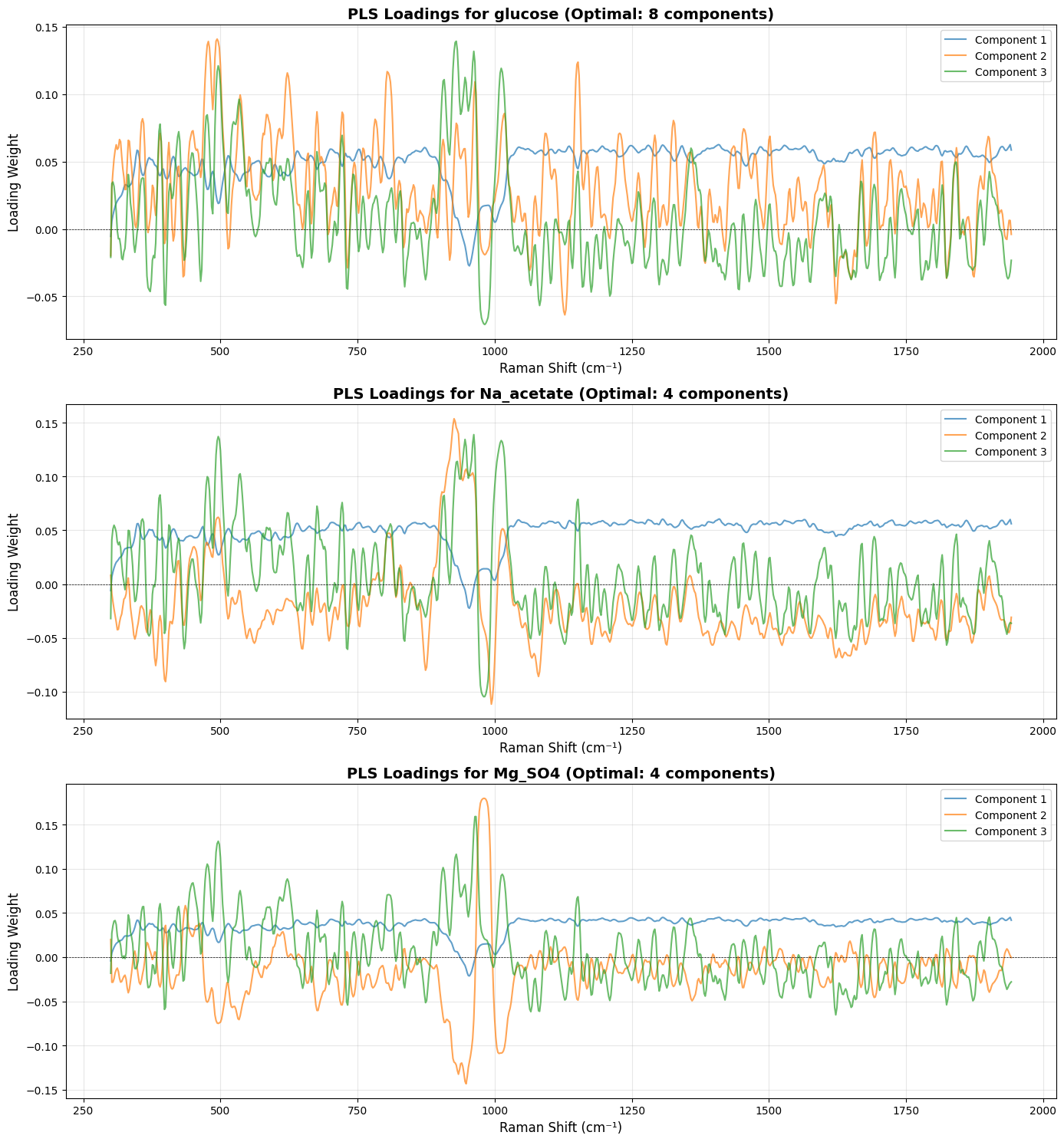
================================================================================
Performance Comparison: Single Multi-Output Model vs. Separate Models
================================================================================
Target          Single Model R²    Separate Model R²  R² Improvement  Single RMSE     Separate RMSE   RMSE Improvement
--------------------------------------------------------------------------------
glucose                    0.3915            0.3857        -0.0058         3.3367 g/L         3.3525 g/L        -0.0159 g/L
Na_acetate                -0.1697            0.0156        +0.1853         0.5485 g/L         0.5032 g/L        +0.0453 g/L
Mg_SO4                     0.7974            0.8131        +0.0157         0.6159 g/L         0.5916 g/L        +0.0243 g/L
================================================================================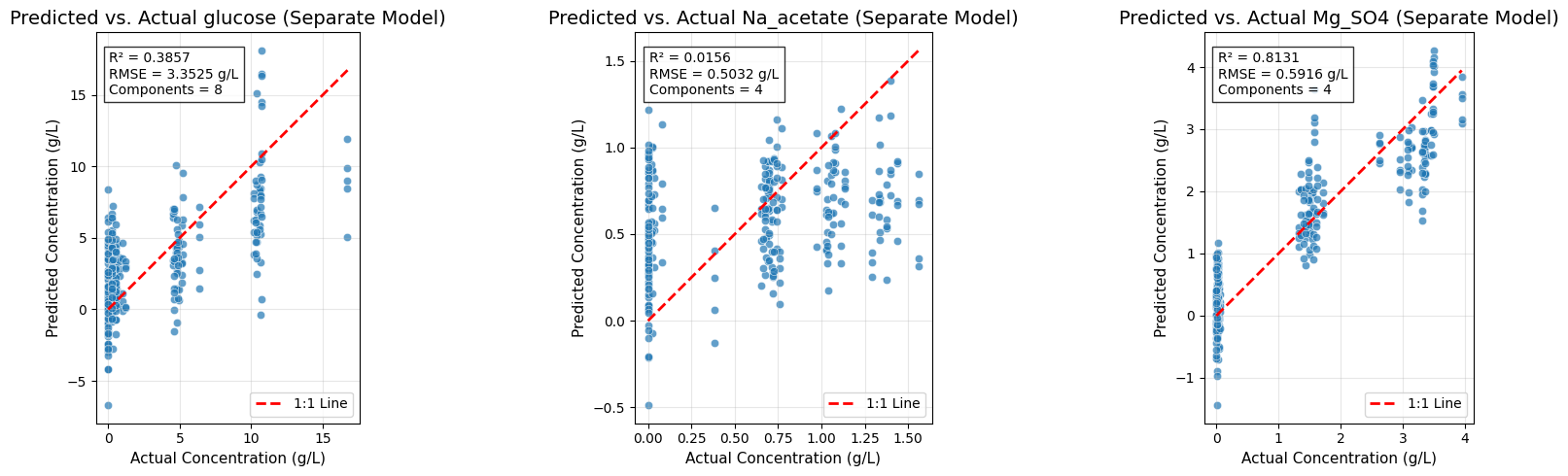
Conclusion
This notebook fitted PLS regression models predicting the concentrations of glucose, sodium acetate, and magnesium sulfate from Raman spectra recorded on the anton_532 instrument.
Preprocessing pipeline
Spectra were cropped to 300–1942 cm⁻¹, the largest range common to all eight instruments; despiked with the Whitaker–Hayes algorithm to remove cosmic-ray artifacts; smoothed with a Savitzky–Golay filter (window length 9, polynomial order 3); and baseline-corrected with adaptive smoothness penalized least squares (asPLS) to remove the fluorescence background.
MinMax normalization was applied last. It is not the right choice for quantitative work, but the raw intensities reach values around 350 in arbitrary units and do need scaling, and the dataset provides no reference band on which to base an internal standard.
Modeling approach
Two strategies were compared, each selecting its component count by grouped cross-validation.
A single multi-output model predicting all three analytes at once settled on 12 components, for an overall R² of 0.34 and an RMSE of 1.50 g/L. That aggregate hides a wide spread: R² 0.39 for glucose, 0.80 for magnesium sulfate, and −0.17 for sodium acetate — worse than predicting the mean.
Fitting one model per analyte gives 8 components and R² 0.39 (RMSE 3.35 g/L) for glucose, 4 components and R² 0.02 (RMSE 0.50 g/L) for sodium acetate, and 4 components and R² 0.81 (RMSE 0.59 g/L) for magnesium sulfate.
Key insights
The gap between the two strategies is narrower than it first looks, and concentrated in one place. Glucose is marginally worse with a dedicated model (0.386 against 0.392) and magnesium sulfate marginally better (0.813 against 0.797); both differences are within noise. The whole of the gain is on sodium acetate, which moves from −0.17 to 0.02. Made to share twelve components with two analytes that dominate the covariance, the joint model actively degraded its weakest target; given four components of its own, it merely fails to predict it.
The second argument for separate models is interpretability: each carries its own loadings, which can be read against known band positions instead of mixing three chemistries into one shared set of components.
The spread in performance follows the spectroscopy rather than anything about the models. MgSO₄ predicts well because it has a strong, isolated band near 980 cm⁻¹. Glucose is moderate: its bands between 800 and 1150 cm⁻¹ are present but overlapping. Sodium acetate does not predict at all — its band near 920 cm⁻¹ is weak and crowded by its neighbors, and an R² of 0.02 is indistinguishable from zero. For acetate, every component count other than 4 gives a negative R², which is the signature of a model fitting noise rather than one that needs tuning.
That is also where to go next. Better results for acetate would come from a preprocessing or feature-selection step that isolates its band, or from a model able to exploit the joint structure of the three analytes — not from adding components.
PLS regression
The problem
A preprocessed spectrum has as many features as it has wavenumbers, and the dataset has far fewer samples than that. Worse, adjacent wavenumbers are almost perfectly correlated, so the design matrix is severely rank-deficient and ordinary least squares is not merely unstable but undefined. Partial least squares is the standard chemometrics answer, and the baseline against which (Lange et al. 2025) measures everything else: rather than regressing on the wavenumbers, it builds a small number of latent components chosen to have maximal covariance with the targets, and regresses on those.
Formally, given centered data matrices \(X \in \mathbb{R}^{n \times p}\) and \(Y \in \mathbb{R}^{n \times q}\) and a number of components \(K\), we seek a low-dimensional representation of \(X\) that both reconstructs \(X\) and predicts \(Y\). Here \(n\) is the number of spectra, \(p\) the number of wavenumbers, \(q = 3\) the number of analytes, and \(K\) is chosen by cross-validation.
Two variants are worth distinguishing, because scikit-learn implements both and they are easily confused. PLSCanonical, also known as PLSW2A, treats \(X\) and \(Y\) symmetrically and is a decomposition method. PLSRegression, the one used in the notebook and derived below, breaks that symmetry deliberately in order to predict \(Y\) from \(X\). The difference reduces to two changes in the algorithm, both appearing in step (c) and step (d) below: the \(Y\)-weights are not normalized, and \(Y\) is regressed and deflated on the \(X\)-scores rather than on its own.
The algorithm
Start from \(X_0 = X\) and \(Y_0 = Y\), both column-centered and, with scikit-learn’s default scale=True, scaled to unit variance. For each component \(k = 1, \dots, K\):
(a) Weights. Form the cross-covariance matrix \(C_k = X_{k-1}^\top Y_{k-1}\) and take its leading singular pair,
\[ (w_k, c_k) = \arg\max_{\|w\| = 1} w^\top C_k c , \]
with \(w_k \in \mathbb{R}^p\) constrained to unit norm and \(c_k \in \mathbb{R}^q\) left unnormalized. These are the directions in the two spaces whose projections covary most. They can be obtained by a full SVD of \(C_k\) or, as scikit-learn does by default, by power iteration (NIPALS).
(b) Scores. Project the data onto the weights,
\[ t_k = X_{k-1} w_k \in \mathbb{R}^n , \qquad u_k = \frac{Y_{k-1} c_k}{c_k^\top c_k} \in \mathbb{R}^n . \]
The scores are the coordinates of the samples in the latent space. The \(X\)-score \(t_k\) does all the work below; \(u_k\) is exposed by scikit-learn as y_scores_ but takes no part in either the deflation or the prediction, which is the whole point of regression mode.
(c) Loadings. Regress the original variables on the \(X\)-score:
\[ p_k = \frac{X_{k-1}^\top t_k}{t_k^\top t_k} \in \mathbb{R}^p , \qquad q_k = \frac{Y_{k-1}^\top t_k}{t_k^\top t_k} \in \mathbb{R}^q . \]
Both loadings use \(t_k\). This is the asymmetry that defines PLSRegression: PLSCanonical would compute \(q_k = Y_{k-1}^\top u_k / (u_k^\top u_k)\), treating each block on its own terms. Here \(Y\) is described entirely through the latent variables extracted from \(X\), which is what a predictive model needs.
(d) Deflation. Subtract the rank-one structure just extracted,
\[ X_k = X_{k-1} - t_k p_k^\top , \qquad Y_k = Y_{k-1} - t_k q_k^\top . \]
Again both use \(t_k\). Deflation is what guarantees that the next component finds covariance structure that the previous ones did not already explain.
Matrix decompositions
Collecting the \(K\) components into matrices gives two low-rank approximations,
\[ X \approx T P^\top , \qquad Y \approx T Q^\top , \]
with \(T = [t_1, \dots, t_K] \in \mathbb{R}^{n \times K}\), \(P = [p_1, \dots, p_K] \in \mathbb{R}^{p \times K}\), and \(Q = [q_1, \dots, q_K] \in \mathbb{R}^{q \times K}\).
The same \(T\) appears in both. Spectra and concentrations are expressed in one shared coordinate system, and prediction amounts to reading a sample’s coordinates off its spectrum and evaluating the second decomposition. This is what makes PLS loadings chemically interpretable: a column of \(P\) shows which spectral regions define a component, and the corresponding column of \(Q\) shows what that component says about each analyte.
The rotation matrix
During fitting, the scores are computed sequentially on deflated data. For a new spectrum we need a single matrix \(R_x \in \mathbb{R}^{p \times K}\) with \(T = X R_x\), so that \(T_{\text{new}} = X_{\text{new}} R_x\) without replaying the deflation.
The obvious guess \(T = XW\) is wrong for every component after the first, because \(w_k\) was computed on \(X_{k-1}\) while \(X\) is undeflated; deflation breaks the direct correspondence between weights and scores. The fix follows from the decomposition. Multiplying \(X \approx TP^\top\) on the right by \(W\) gives \(XW \approx TP^\top W\), and since \(P^\top W \in \mathbb{R}^{K \times K}\) is invertible,
\[ R_x = W\big(P^\top W\big)^{-1} , \qquad T = X R_x . \]
The dimensions run
\[ X \in \mathbb{R}^{n \times p}, \quad W \in \mathbb{R}^{p \times K}, \quad P \in \mathbb{R}^{p \times K}, \quad P^\top W \in \mathbb{R}^{K \times K}, \quad R_x \in \mathbb{R}^{p \times K}, \quad T \in \mathbb{R}^{n \times K} . \]
Read it as a correction: \(W\) gives raw projections computed on deflated data, \((P^\top W)^{-1}\) compensates for the interference between successive components, and the product is the equivalent direct projection from the original space. Geometrically, the rotation matrix folds the entire sequential deflation back into a single linear map. scikit-learn stores it as x_rotations_, alongside the analogous \(R_y = C(Q^\top C)^{-1}\) in y_rotations_.
Prediction
Everything needed is now in place. Scores come from the spectrum through \(T = X R_x\), and concentrations come from the scores through \(Y \approx T Q^\top\), so
\[ \hat{Y} = X R_x Q^\top , \qquad B = R_x Q^\top \in \mathbb{R}^{p \times q} , \]
and the fitted model is the single linear map \(\hat{Y} = XB\). The pipeline is
\[ X \;\xrightarrow{\;R_x\;}\; T \;\xrightarrow{\;Q^\top\;}\; \hat{Y} . \]
There is no separate regression between the latent spaces. Because step (c) already fitted \(Y\) against \(t\), the \(Y\)-loadings are the latent regression coefficients. PLSCanonical, having fitted \(Y\) against \(u\), needs an extra least-squares step \(U \approx TG\) and predicts through \(R_x G Q^\top\) instead — a third stage that regression mode makes unnecessary.
In scikit-learn, \(B\) is stored in coef_ with the standardization folded in and transposed to shape \((q, p)\): coef_ \(= (R_x Q^\top \sigma_y)^\top / \sigma_x\), with intercept_ \(= \bar{y}\), so that predict evaluates \((X - \bar{x})\,\texttt{coef\_}^\top + \bar{y}\).
Summary
| Concept | Symbol | Dimension | Meaning |
|---|---|---|---|
| Weights | \(W, C\) | \(p \times K\), \(q \times K\) | Directions of maximal shared covariance |
| Scores | \(T\) | \(n \times K\) | Coordinates of the samples in the latent space |
| Loadings | \(P, Q\) | \(p \times K\), \(q \times K\) | Reconstruction of \(X\) and of \(Y\) from those coordinates |
| Rotation | \(R_x\) | \(p \times K\) | Direct projection from spectra to scores |
| Coefficients | \(B\) | \(p \times q\) | The fitted linear map \(X \to Y\) |
\[ T = X R_x , \qquad X \approx T P^\top , \quad Y \approx T Q^\top , \qquad \hat{Y} = XB \ \text{ with }\ B = R_x Q^\top . \]
The one hyperparameter is \(K\). Too few components underfit, too many start fitting noise, and the notebook selects it by scanning \(K = 1, \dots, 20\) and minimizing the cross-validated RMSE. The folds are built with GroupKFold on the sample index so that replicate spectra of the same sample never straddle the train/validation split, which would otherwise leak the answer and produce an optimistic estimate of performance on genuinely new samples.
Conclusion
Most of the work in this post is preprocessing, and that is the honest proportion. The physics of Section 1 explains why: the signal is one photon in \(10^7\), riding on a fluorescence background that can be larger than it is, on a detector that cosmic rays hit. Cropping, despiking, denoising, and baseline correction are not data hygiene applied before the interesting part — they are what turns a measurement into something a linear model can be fitted to at all.
The model that follows is deliberately simple, and the results on the anton_532 instrument show both what it buys and where it stops. Magnesium sulfate is predicted well (\(R^2 \approx 0.81\)), glucose moderately (\(R^2 \approx 0.39\)), and sodium acetate not at all (\(R^2 \approx 0.02\)). The pattern tracks the spectroscopy rather than the machine learning: MgSO₄ has a strong, isolated band near 980 \(\text{cm}^{-1}\), whereas the acetate band near 920 \(\text{cm}^{-1}\) is weaker and overlaps its neighbors.
Fitting one PLS model per analyte rather than a single multi-output model changes less than one might expect, and the little it changes is concentrated in one place. Glucose and magnesium sulfate move by a few thousandths of \(R^2\), in opposite directions. What separate models fix is acetate, which the joint model predicted at \(R^2 = -0.17\) — worse than the sample mean. Made to share twelve components with two analytes that dominate the covariance, the joint model actively degraded its weakest target; given four components of its own, it merely fails to predict it. The other argument for fitting separately is interpretability, since each model then carries loadings that can be read directly against known band positions instead of mixing three chemistries into one shared set of components.
Two limitations are worth naming. MinMax normalization was chosen for want of an internal standard, and it couples the scale of every spectrum to a single point; a proper reference band, or a normalization that preserves the height-to-concentration relation, would be the first thing to revisit. And the models here are fitted per instrument, which sidesteps rather than solves the transfer problem that the original dataset was built to pose. Transfer across spectrometers is where the SpecBERT experiment in the accompanying codebase is aimed: pretraining on unlabeled spectra from many instruments is a plausible way to learn representations that survive the change of device, in a setting where spectra are cheap and concentration labels are not.
References
Eilers, Paul H. C., and Hans F. M. Boelens. 2005. Baseline Correction with Asymmetric Least Squares Smoothing. No. 1. Leiden University Medical Centre.
Georgiev, Dimitar, Simon Vilms Pedersen, Ruoxiao Xie, Alvaro Fernández-Galiana, Molly M Stevens, and Mauricio Barahona. 2024. “RamanSPy: An Open-Source Python Package for Integrative Raman Spectroscopy Data Analysis.” Analytical Chemistry 96 (21): 8492–500. https://doi.org/10.1021/acs.analchem.4c00383.
Hassfurther, Rosa. 2025. Dig4Bio Raman Transfer Learning Challenge. https://kaggle.com/competitions/dig-4-bio-raman-transfer-learning-challenge.
Lange, Christoph, Maxim Borisyak, Martin Kögler, et al. 2025. “Comparing Machine Learning Methods on Raman Spectra from Eight Different Spectrometers.” Spectrochimica Acta Part A: Molecular and Biomolecular Spectroscopy 334: 125861. https://doi.org/10.1016/j.saa.2025.125861.
Savitzky, Abraham, and Marcel J. E. Golay. 1964. “Smoothing and Differentiation of Data by Simplified Least Squares Procedures.” Analytical Chemistry 36 (8): 1627–39. https://doi.org/10.1021/ac60214a047.
Whitaker, Daniel A., and Kevin Hayes. 2018. “A Simple Algorithm for Despiking Raman Spectra.” Chemometrics and Intelligent Laboratory Systems 179: 82–84. https://doi.org/10.1016/j.chemolab.2018.06.009.
Wikipedia contributors. 2025. Raman Spectroscopy. https://en.wikipedia.org/w/index.php?title=Raman_spectroscopy&oldid=1328445745.
Zhang, Feng, Xiaojun Tang, Angxin Tong, et al. 2020. “Baseline Correction for Infrared Spectra Using Adaptive Smoothness Parameter Penalized Least Squares Method.” Spectroscopy Letters 53 (3): 222–33. https://doi.org/10.1080/00387010.2020.1730908.
Zhang, Zhi-Min, Shan Chen, and Yi-Zeng Liang. 2010. “Baseline Correction Using Adaptive Iteratively Reweighted Penalized Least Squares.” Analyst 135 (5): 1138–46. https://doi.org/10.1039/B922045C.
Citation
BibTeX citation:
@online{brosse2026,
  author = {Brosse, Nicolas},
  title = {Analyzing {Raman} Spectra with Machine Learning},
  date = {2026-01-18},
  url = {https://nbrosse.github.io/posts/raman/raman.html},
  langid = {en}
}
For attribution, please cite this work as:
Brosse, Nicolas. 2026. “Analyzing Raman Spectra with Machine
Learning.” January 18. https://nbrosse.github.io/posts/raman/raman.html.